31 Technology Survey Questions
Explore 25 technology survey questions with sample answers to boost insights, improve feedback, and understand user needs in tech research.
Technology survey questions are the prompts you use in a tech survey to measure adoption, satisfaction, usability, readiness, and business impact. The right technology survey or technology adoption questionnaire helps you see what is working, what is stuck, and where your team is quietly wrestling with a password reset at 4 p.m.
You might also see terms like information technology survey, digital transformation survey questions, and digital adoption questions. Plus, this guide walks you through the most useful survey types, when to use each one, sample questions, and how to turn answers into action.
Employee Technology Usage Survey Questions
Sample questions
Which digital tools or platforms do you use most often to complete your daily work?
How many different tools do you typically switch between to complete one task?
Which technology helps you work most efficiently, and why?
Which tool or system creates the most friction in your workflow?
Are there any tools your team pays for or has access to that you rarely or never use?
Why & When to Use
This tech survey shows how work really gets done.
An employee technology survey measures how people actually use workplace tools, devices, platforms, and systems day to day, not just what IT thinks is being used.
That makes this kind of technology adoption questionnaire especially useful when you want a clearer picture of habits, workarounds, and tool overload.
Use this technology survey questions during software reviews, annual IT planning, tool consolidation projects, remote or hybrid work changes, and productivity improvement efforts.
Plus, it works well as an internal information technology survey because it helps you connect technology usage to real workflows, team needs, and wasted spend.
Here’s the thing: people often bounce between more apps than a caffeinated squirrel, and that switching cost adds up fast.
A strong tech survey can help you spot:
the tools employees rely on most
overlap between similar platforms
shadow IT or unofficial tools teams adopted on their own
underused subscriptions that quietly drain budget
systems that slow work down instead of speeding it up
On top of that, you can make responses more useful by asking employees to quantify frequency, time saved, and the number of tools used per task.
Segment results by department, role, and work environment so your technology surveys reveal patterns you can actually act on.
Microsoft observed that more total screen switches during the workday predicted lower self-reported productivity, supporting survey questions about tool switching and workflow friction (source)
How to create a technology survey in HeySurvey
1. Create a new survey
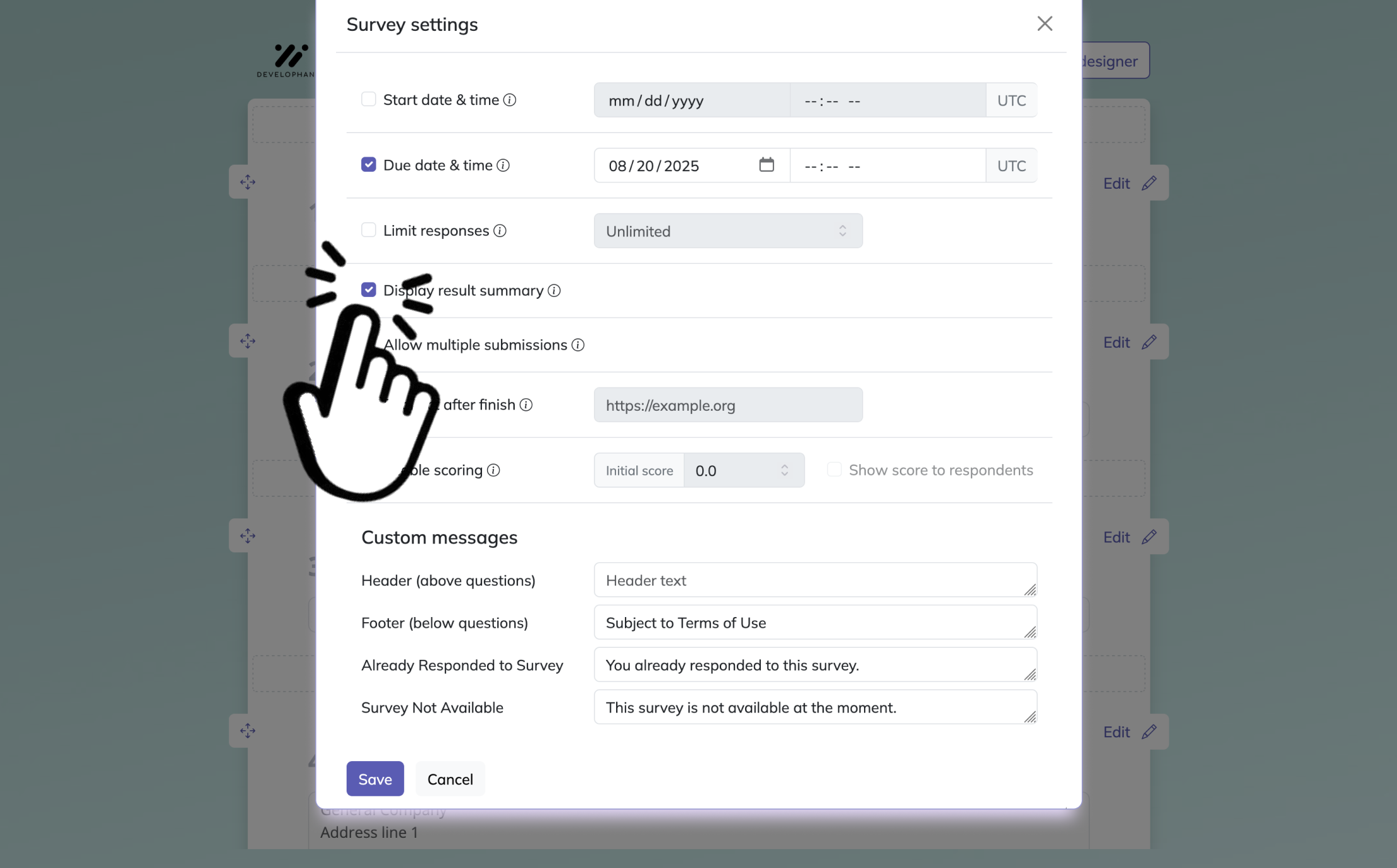
Click the button below to open a template, or start from an empty sheet if you want to build your technology survey from scratch. Give your survey a clear name so you can find it later, then open it in the survey editor. If you want, you can also add your logo and adjust the basic settings before moving on.
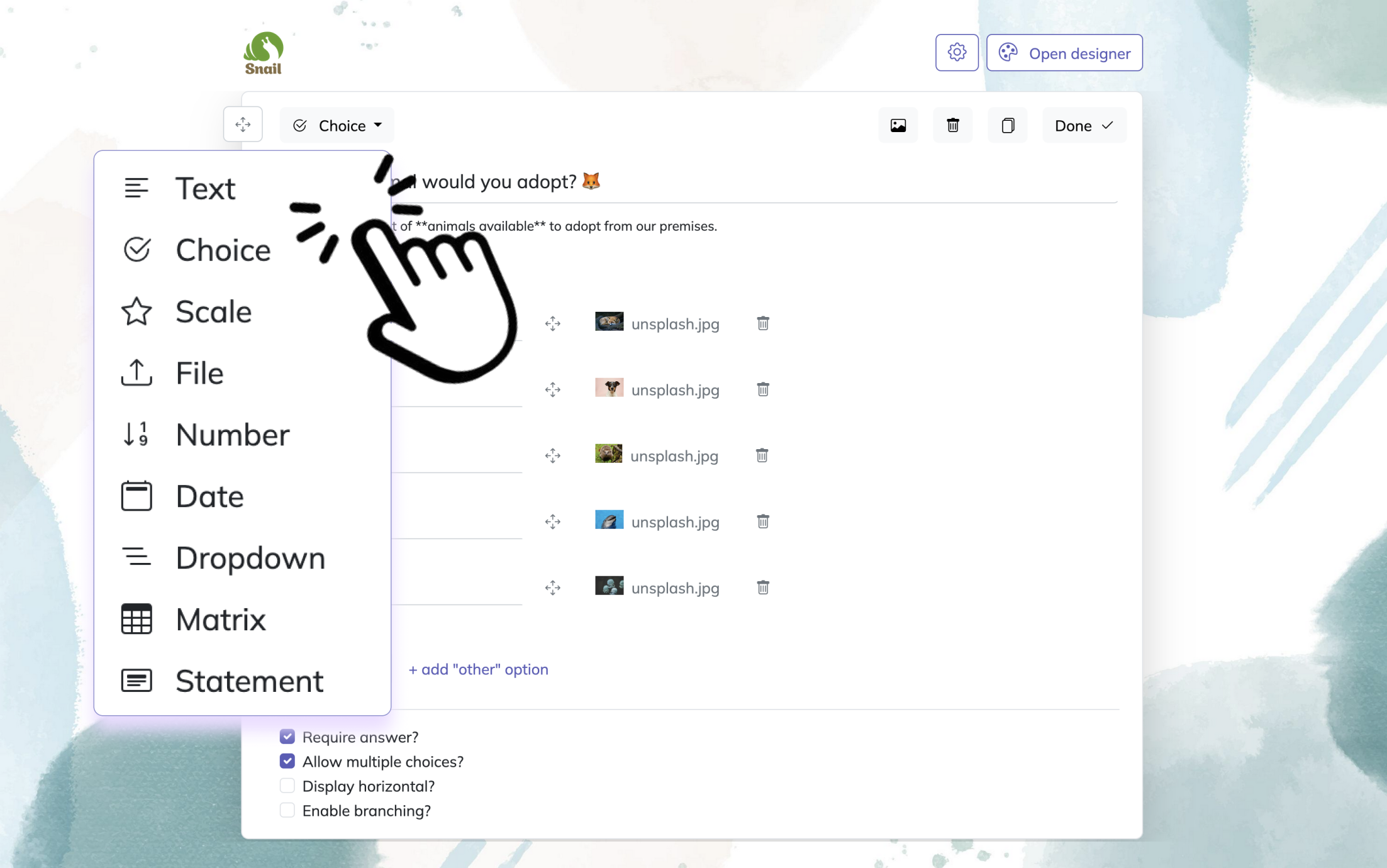
2. Add questions
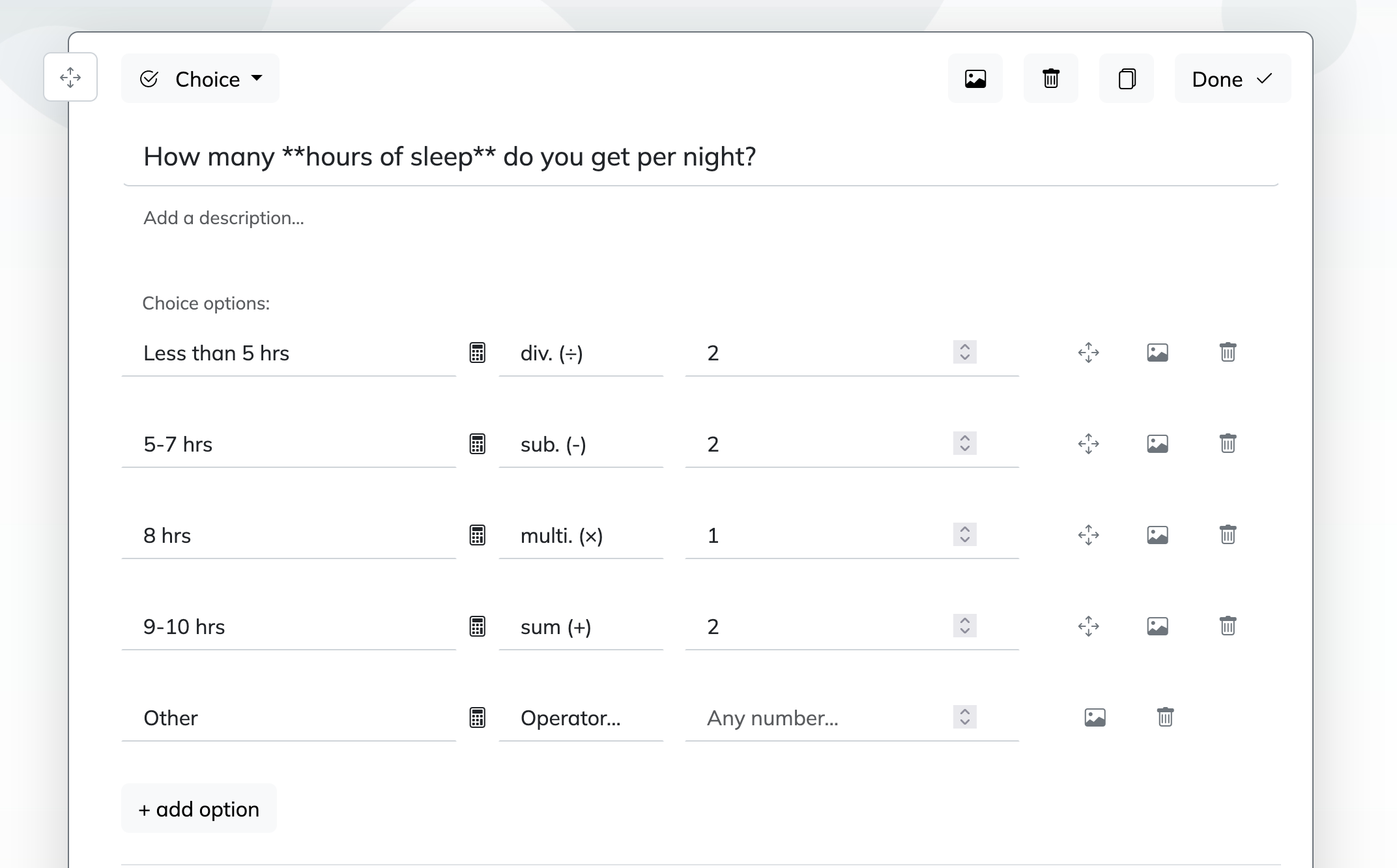
Click Add Question and choose the best question type for each item. For a technology survey, use Choice for device or software options, Scale for satisfaction or usability ratings, NPS for loyalty questions, and Text for open feedback. Add required questions where needed, and keep the wording simple so respondents can answer quickly. You can also reorder questions and add descriptions for extra context.
3. Publish your survey
Before sharing, use Preview to check how the survey looks on desktop and mobile. When everything is ready, click Publish to create your shareable survey link. Then send the link to your audience and start collecting responses.
Technology Adoption Survey Questions
Sample questions
How confident do you feel using the new technology without assistance?
How often do you use the new platform as part of your regular workflow?
What has been the biggest barrier to adopting this technology?
How effective was the training or onboarding you received?
What would make you more likely to use this technology consistently?
Why & When to Use
A technology adoption questionnaire shows whether rollout success is real or just wishful thinking.
This type of tech survey helps you measure awareness, onboarding success, user confidence, adoption barriers, and actual day-to-day usage after a new system goes live.
That makes it one of the most useful technology surveys for understanding whether people are truly using the tool, or just politely nodding at it in meetings.
Use this technology survey at key stages:
before launch to measure readiness, expectations, and concerns
30 to 90 days after implementation to check early adoption and friction
after training sessions or process updates to see what improved
Here’s the thing: a shiny launch does not always equal real adoption.
A strong technology adoption questionnaire helps you compare intended adoption versus actual behavior, so you can see whether the tool fits naturally into workflows or gets quietly ignored.
Plus, it works well alongside digital adoption questions because it captures both perception and behavior.
Look for patterns like:
low confidence but high usage, which can signal training gaps
high awareness but low usage, which may point to unclear value
positive attitudes with slow adoption, which can suggest usability issues
On top of that, this tech survey helps you pinpoint whether resistance comes from poor onboarding, clunky design, or a simple lack of "why should I care?"
Technology adoption surveys should prioritize usefulness and ease-of-use questions, as these strongly predict intention to use new systems in TAM research (Source).
IT Support and Help Desk Survey Questions
Sample questions
How satisfied were you with the speed of resolving your issue?
Was the IT support team able to understand your problem clearly?
How easy was it to submit a support request?
Did the solution fully resolve your issue the first time?
What could the IT support experience have done better?
Why & When to Use
A help desk tech survey shows how support feels on the user side, not just how it looks in a dashboard.
This type of technology survey measures the experience people have with IT service delivery, including response time, issue resolution, communication, and overall support quality.
In other words, it helps you see whether your team is solving problems efficiently or sending users into the classic "have you tried turning it off and on again?" loop.
Use this information technology survey at smart moments like:
right after a ticket is resolved to capture fresh feedback
quarterly to benchmark service quality and spot trends
during help desk improvement projects or workflow changes
A strong tech survey in this area should cover a few core metrics:
CSAT, or customer satisfaction, to measure overall support experience
first-contact resolution, to see whether issues are fixed the first time
communication quality, to understand whether updates were clear and helpful
Plus, this technology adoption questionnaire style can work well when paired with ticket data like resolution time, reopen rates, and escalation volume.
Open-ended responses matter too, because they often reveal recurring pain points that numbers alone miss, such as confusing request forms, unclear updates, or support that feels technically correct but not very human.
Digital Transformation Survey Questions
Sample questions
How well do our current technologies support business goals and future growth?
Do you believe leadership communicates a clear vision for digital transformation?
Which business processes are still too manual or outdated?
How prepared does your team feel for upcoming technology-driven changes?
What digital improvement would have the greatest impact on productivity or customer experience?
Why & When to Use
Digital transformation survey questions help you measure whether your organization is truly ready to change, not just ready to buy new tools.
A strong tech survey in this category looks at organizational readiness, leadership alignment, process modernization, and the real impact of digital initiatives across the business.
Here's the thing, a technology survey about transformation should cover people, process, and technology equally, because transformation is bigger than a shiny software purchase and a hopeful kickoff meeting.
Use this technology adoption questionnaire when you need strategic clarity, especially during:
strategic planning cycles
change management programs
modernization efforts across departments
enterprise transformation reviews
On top of that, digital transformation survey questions are useful for gap analysis and prioritization, helping you spot where teams feel blocked, where workflows still drag, and where investment could make the biggest difference.
This kind of technology survey can also explore broader modernization themes, including automation, data usage, collaboration tools, and even mic digital technologies when they are part of your operating environment or future roadmap.
Plus, if you want the tech survey meaning in plain English, it is simple: you are checking whether your business can adapt, align, and improve without turning every update into a mild office panic.
Use results from these technology surveys to decide what to fix first, what to modernize next, and where leadership needs to communicate better.
McKinsey found digital transformations succeed more often when employees help identify digitization opportunities, making success 1.4 times likelier (source).
Customer Technology Experience Survey Questions
Sample questions
How easy was it to use our website, app, or digital platform?
Were you able to complete your goal without needing extra support?
Which part of the digital experience felt confusing or frustrating?
How satisfied are you with the speed and reliability of the platform?
What feature or improvement would most improve your experience?
Why & When to Use
Customer experience with technology can make or break trust faster than you can say "loading screen."
This type of tech survey focuses on how customers experience your website, app, portal, digital services, self-service tools, and other tech-enabled interactions.
Here's the thing, even a polished platform can hide friction if customers get stuck, feel confused, or quietly give up before finishing what they came to do.
Use this technology survey after moments like:
product launches
website redesigns
app updates
checkout flow changes
customer portal improvements
A strong technology adoption questionnaire in this area helps you measure usability, task completion, and friction points, so you can see whether customers are moving smoothly or hitting digital potholes.
Plus, these technology survey questions matter when external user experience affects retention, satisfaction, and conversion rates, not just internal efficiency.
On top of that, you will get better insights if you separate responses by:
device type
customer segment
journey stage
That makes it easier to spot whether mobile users struggle more, new customers need extra help, or specific steps in the journey create drop-off.
This kind of technology survey also fits broader searches around customer-facing technology surveys, especially when you need practical feedback that leads to smarter fixes, better experiences, and fewer abandoned clicks.
Technology Needs Assessment Survey Questions
Sample questions
What technology limitations currently slow down your work or project delivery?
Which new tools, systems, or capabilities would most improve outcomes?
Are your current hardware, software, and connectivity resources sufficient?
What type of technology training or support do you need most?
Which technology investment should be prioritized in the next 6-12 months?
Why & When to Use
This tech survey helps you spot what is missing before those gaps get expensive.
A technology needs assessment survey is built to uncover technology gaps, future requirements, infrastructure needs, training requests, and smart opportunities for investment.
Here's the thing, if you wait until a project is behind schedule or your team is improvising with duct-tape workflows, the answers usually cost more.
Use this technology survey before moments like:
budgeting cycles
procurement decisions
project planning
digital roadmap reviews
any survey of technology for project evaluation
This kind of technology adoption questionnaire helps you understand what people need right now, what will matter next, and where current systems are falling short.
Plus, it works especially well when you want technology surveys that support planning instead of just documenting complaints.
To make the results useful, ask people to rate needs by:
impact
urgency
cost
effort to implement
On top of that, cover both immediate pain points and future-state needs, so your information technology survey does more than patch today's problems.
That gives you stronger input for budgets, better business cases, and clearer priorities for tools, infrastructure, support, and training. Practical, tidy, and much less dramatic than an emergency software purchase.
Questions About Technology for Students and Education Surveys
Sample questions
Do you have reliable access to the device and internet connection needed for learning?
How comfortable are you using learning platforms or educational technology tools?
Which digital tools help you learn most effectively?
What technology-related challenges make learning harder for you?
What additional support or training would improve your experience with technology?
Why & When to Use
This technology survey helps you see whether learners are equipped, confident, and ready to participate.
Education-focused tech survey questions help you measure access, engagement, platform usability, and digital confidence across student groups.
Here's the thing, a strong technology adoption questionnaire in education is not just about asking who has a laptop. You also want to know who can actually use the tools well without feeling like the login screen is a final exam.
Use this technology survey in settings like:
K-12 schools
colleges and universities
online learning programs
workforce training cohorts
digital literacy assessments
Plus, this kind of technology survey works well when you need to uncover gaps in access equity, digital skills, and support needs before they affect learning outcomes.
Keep the wording simple, especially for younger students or broad student audiences.
On top of that, you can adapt the same technology surveys for parents, teachers, or adult learners by changing the wording to match their role and experience.
You may also see people search for this topic using terms like preguntas sobre la tecnología, preguntas de tecnología, or preguntas sobre la tecnología para una encuesta.
That makes this section useful whether you are building a school-facing information technology survey or a practical set of digital transformation survey questions for learning environments.
Best Practices for Writing and Using Technology Survey Questions
Sample questions
How often do you use this tool in a typical week?
What is the main reason you do not use this feature?
How satisfied are you with the reliability of this system?
Which task takes longer than it should because of current technology?
What one improvement would have the biggest positive impact?
Why & When to Use
These rules help you build a better tech survey before you build the survey itself.
This section gives you the ground rules for writing a strong technology survey, no matter whether you are creating a customer tech survey, an employee information technology survey, or a full technology adoption questionnaire.
Here's the thing, if your questions are vague, biased, or bloated, your data will be too. A messy technology survey is like asking your GPS for directions with no address.
Use these best practices before launching any technology survey workflow because they help you improve question quality, response rates, and reporting.
Do this when writing technology surveys:
Use simple, specific language.
Ask one thing per question.
Mix rating, multiple-choice, and open-ended formats.
Tailor the technology survey to the audience and tool context.
Keep it short enough to finish without sighing dramatically.
Avoid this:
Using jargon without explanation.
Asking leading or biased questions.
Making every question mandatory.
Collecting data you will not use.
Ignoring segmentation and follow-up analysis.
Plus, think about answer scales, anonymity, timing, and pilot testing before launch.
On top of that, you can summarize responses into utilization status, result of questionnaire, examples of utilization, to spot usage patterns and turn tech survey meaning into action.
How to Turn Technology Survey Insights Into Action
Sample questions
Which survey findings point to the biggest barriers to adoption or productivity?
What issues appear most often across teams, users, or customer segments?
Which improvements are low effort but high impact?
Where do survey responses conflict with system usage data or support metrics?
What follow-up action should be assigned, by whom, and by when?
Why & When to Use
A great tech survey only pays off when you do something with it.
Collecting responses is just the halfway point. The real value of a technology survey, technology adoption questionnaire, or digital transformation survey shows up when you turn patterns into decisions, fixes, and measurable outcomes.
Here’s the thing, even the smartest technology survey can gather dust if nobody owns the next step. Data without action is basically a very organized shrug.
Use this final step after any tech survey or information technology survey to move from opinions to priorities.
To turn technology survey insights into action, start by grouping responses into themes like:
usability
access
training
integration
support
Plus, prioritize what to fix using impact-versus-effort logic.
High impact and low effort items should go first.
High impact and high effort items need planning and sponsorship.
Low impact items can wait unless they solve a frequent pain point.
On top of that, compare your technology surveys with analytics, support tickets, and adoption metrics. If survey feedback says a tool is easy but usage is falling, that is your cue to dig deeper.
Finally, close the loop with respondents by sharing findings, next steps, and owners. The best technology survey questions do not just collect answers, they help you drive better decisions, stronger adoption, and smoother digital experiences.
Related IT Survey Surveys
27 Power BI Survey Questions
Explore 25 Power BI survey questions with sample answers, tips, and insights to improve reporting...

31 Post Implementation Survey Questions
Explore 25 post implementation survey questions with sample answers to improve feedback collectio...

29 IT Department Survey Questions for Employees
Explore **department survey questions for employees** with **25 sample questions** to improve fee...