29 Video Game Survey Questions
Explore 25 video game survey questions sample questions for research, feedback, and insights into player preferences, habits, and opinions.
Great games are not built on guesses. They improve when you use a video game survey or video game feedback form to ask players the right questions at the right time. Video game survey questions help you shape design, retention, monetization, community health, and marketing without playing detective in your own Discord.
Here’s the thing, the best video game surveys depend on your stage of development and the decision in front of you. Plus, this guide will walk you through practical survey types, sample questions, best practices, and how to turn player responses into action.
Sample questions
What age range do you fall into?
Which platforms do you use to play video games most often?
How many hours per week do you typically spend playing video games?
Which video game genres do you play most frequently?
Do you usually play solo, with friends, or with online strangers?
Player Demographic and Gaming Habits Survey Questions
Know who you are building for
Why & When to Use
This kind of video game survey helps you understand who your players are, how they play, where they play, and what they keep coming back for.
You can use these video game surveys during early audience research, before launching a new title, when refreshing player personas, or when building a video game survey template for recurring audience tracking.
Here’s the thing, this type of questionnaire about computer games is especially useful when you want better segmentation.
It helps you compare casual players vs. core players without relying on gut feel, which is brave but not exactly scientific.
On top of that, a smart video game feedback form in this category can support both research and marketing segmentation.
Keep it practical:
Ask only for demographic details you truly need.
Put behavioral questions before personal questions to improve completion rates.
Use answer choices that match real habits like mobile, PC, console, handheld, and cloud gaming.
Include genres, play frequency, and preferred modes so your video game survey reveals patterns you can actually act on.
Plus, these video game surveys give you cleaner audience clusters, sharper messaging, and better design decisions.
That makes this survey about video games a strong starting point for teams that want less guessing and more useful player insight.
Sample questions
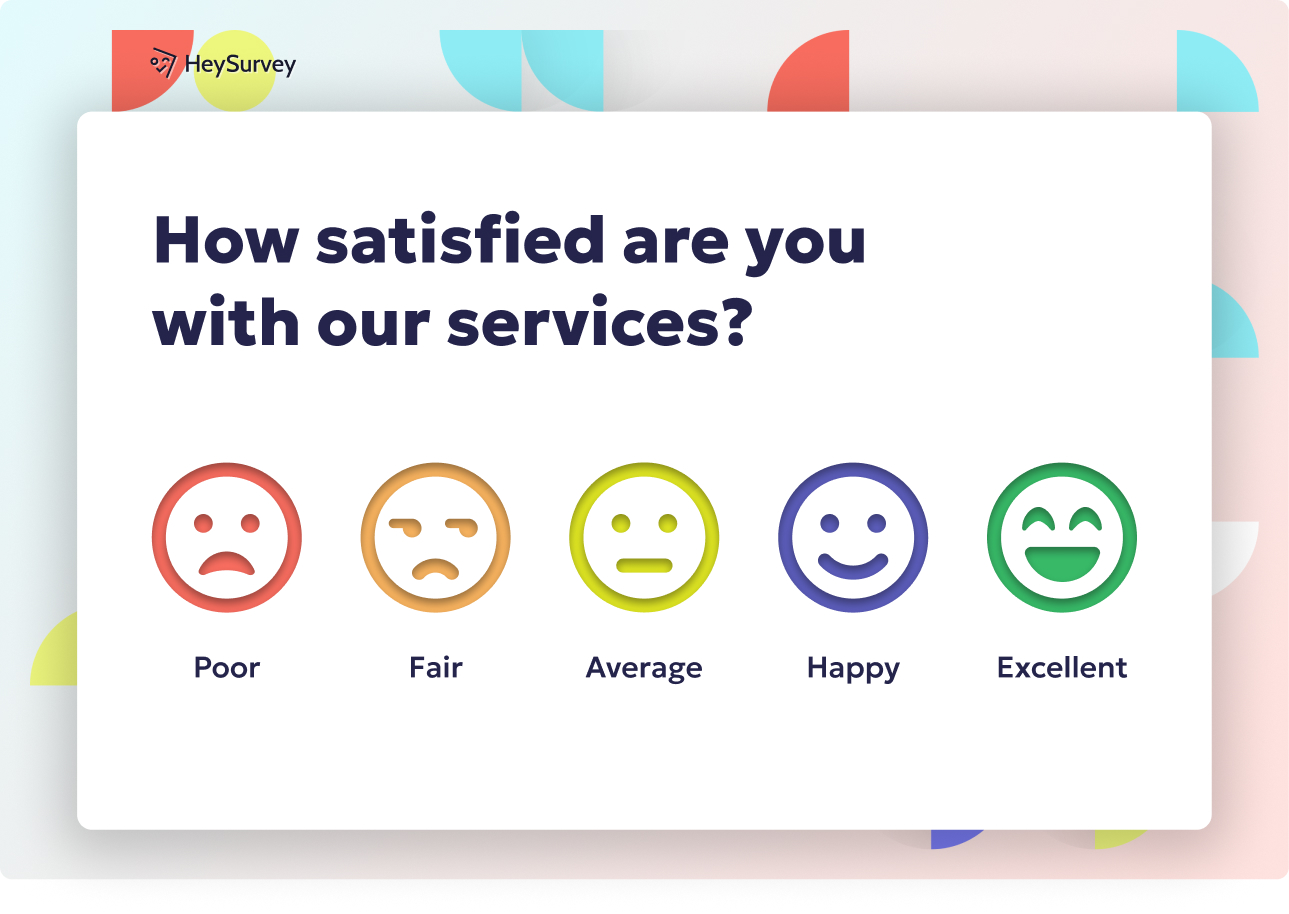
How satisfied are you with the core gameplay experience?
How intuitive did the controls feel during your first few sessions?
How would you rate the game’s difficulty level?
Which part of the gameplay experience felt most enjoyable?
What is the biggest frustration you experienced while playing?
A randomized survey experiment found demographic questions performed best when placed at the end, supporting player-behavior questions before personal ones in game surveys (source).
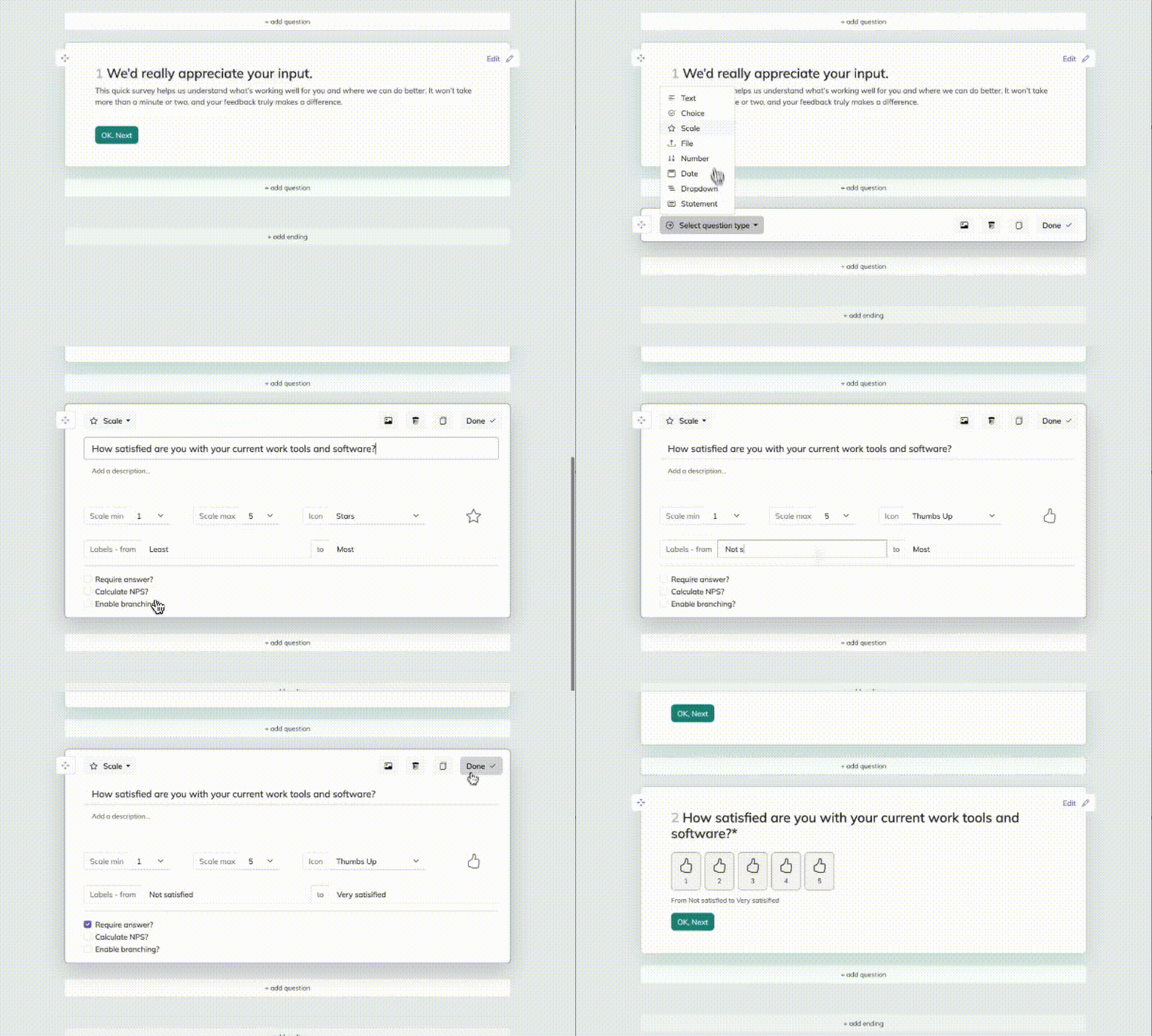
Create your video game survey in 3 easy steps
Create a new survey
Start by opening a video game survey template with the button below, or create a survey from scratch with an online survey maker. If you’re new to HeySurvey, you can begin without an account. Once the survey opens in the editor, you can rename it and adjust the basic settings if needed.Add questions
Click Add Question to build your survey. For a video game survey, use Choice questions for favorite genres or platforms, Scale questions for rating gameplay, and Text questions for open feedback. You can also add images, videos, or an “Other” option to make answers more flexible and engaging. Mark important questions as required to make sure respondents don’t skip them.Publish survey
When your questions are ready, click Preview to check how the survey looks. Then hit Publish to create a shareable link. If you have an account, you can later view responses and edit the survey anytime.
Gameplay Experience and Satisfaction Survey Questions
Find out what playing actually feels like
Why & When to Use
This type of video game survey helps you measure how players feel about core gameplay, controls, difficulty, pacing, fairness, and overall fun.
It works best after playtests, beta periods, major updates, or once players finish a meaningful milestone, because fresh experience beats fuzzy memory every time.
Here’s the thing, this is often the backbone of a video game feedback form because it shows you where the game shines and where it quietly trips over its own shoelaces.
A strong set of video game surveys in this category should mix score-based questions with open-ended follow-ups.
That way, you get both clean trend data and the player comments that explain why a rating dropped from "pretty fun" to "please fix this."
Keep it useful:
Tie responses to progression stage, session count, or time played so your video game survey reflects context, not just opinion.
Ask about tutorials, checkpoints, pacing, and perceived fairness in neutral language.
Use examples that fit action, strategy, simulation, RPG, and multiplayer titles so your video game feedback form stays relevant.
If needed, adapt your video game survey template for different moments in the player journey.
On top of that, these insights help you spot friction early, improve retention, and make smarter design calls with less guesswork.
Sample questions
Based on the title alone, how interested would you be in trying this game?
Which of these two video game titles is more memorable?
What type of game do you expect this title to be?
How appealing does this game concept sound to you?
What words come to mind when you hear this game title or read this description?
A 2018 validation study of 571 players found the GEQ needed a revised five-factor structure, showing gameplay surveys should use empirically validated question frameworks (source).
Game Concept and Title Testing Survey Questions
Test the pitch before you build the castle
Why & When to Use
This kind of video game survey helps you evaluate early concepts, art direction, positioning, messaging, and title appeal before full production or launch.
It is especially useful in pre-production, market validation, store page testing, or inside a naming exercise like a one of two video game titles questionnaire.
Here’s the thing, a smart video game feedback form can tell you whether people are excited by the concept, confused by the title, or expecting a totally different genre. That is a lot cheaper to fix before your team spends months building the wrong thing. Oops.
Plus, this format works well for publishers, indie developers, and marketing teams trying to validate discoverability and first impressions.
Keep your video game surveys clean and useful:
Isolate one variable at a time, such as title, description, art style, or genre framing.
Add expectation-based questions so your questionnaire about computer games reveals positioning gaps early.
When testing title preference, use neutral wording and randomize option order where possible.
Use a video game survey template that compares reactions without stacking the deck.
On top of that, the practical “one of two video game titles” questionnaire method makes preference testing simple, fast, and easier to analyze than open debate.
If you face challenges answering gaming commercial questions with data, this survey type gives you a clearer starting point.
Sample questions
How fair do you think the game’s pricing and rewards systems are?
How likely are you to purchase optional in-game content?
Which types of paid content would you consider valuable?
Have you ever decided not to spend money because the pricing felt too high or unclear?
What would make premium content feel more worth buying?
In-Game Economy, Monetization, and Purchase Intent Survey Questions
Better revenue starts with better player trust
Why & When to Use
This video game survey type helps you understand how players feel about pricing, rewards, progression gates, premium content, battle passes, DLC, and cosmetic purchases.
Here’s the thing, a strong video game feedback form does more than ask who will spend money. It shows you whether players see your system as fair, confusing, generous, or suspiciously shaped like a wallet vacuum.
Use this kind of video game surveys setup before launching a new monetization system, after changing prices, or when revenue metrics suggest friction but your team cannot tell why.
Plus, it is one of the best ways to tackle challenges answering gaming commercial questions with data, especially when stakeholders want proof instead of hunches.
Keep your video game survey template practical and neutral:
Use calm wording so players do not feel judged about spending habits.
Separate willingness to pay from past purchase behavior in your video game feedback form.
Ask about fairness, transparency, value perception, and pay-to-win concerns directly.
Avoid mixing too many opinions into one prompt, because vague questionnaire about computer games results are hard to act on.
Compare responses across spenders and non-spenders to improve both trust and monetization strategy.
On top of that, clear video game surveys can help you tune pricing without annoying your players, which is a pretty nice trick.
Sample questions
How satisfied are you with the game’s multiplayer or matchmaking experience?
How easy is it to find people you enjoy playing with?
How safe and respectful does the in-game community feel?
Which social features do you use most often?
What is the biggest improvement you would like to see in the game’s community or multiplayer systems?
A preregistered survey found 52% of top-grossing mobile games were perceived by players as designed to drive spending, underscoring the value of fairness and pay-to-win survey questions (PMC).
Community, Multiplayer, and Social Experience Survey Questions
Strong social systems keep players coming back
Why & When to Use
This video game survey type helps you explore matchmaking quality, communication tools, social features, toxicity, guild or clan systems, and both cooperative and competitive play.
Here’s the thing, players do not always leave because the core game is bad. Sometimes they leave because teammates are rude, parties are clunky, or matchmaking feels like it was assembled by gremlins.
Use this kind of video game surveys setup for live-service games, online multiplayer titles, esports-focused games, or any release with an active player community.
Plus, a smart video game feedback form helps you spot retention barriers caused by social friction, not just gameplay balance or content gaps.
Keep your video game survey template focused and practical:
Separate technical multiplayer quality from player behavior, so you know whether the problem is lag, matchmaking, or people acting wild in chat.
Cover voice chat, text chat, party tools, moderation, and reporting systems when they matter.
Include questions about guilds, clans, friend systems, and finding teammates in your questionnaire about computer games.
Ask both positive and negative prompts so your video game feedback form does not only collect complaints.
Use community feedback to guide retention strategy, moderation improvements, and social feature roadmaps.
On top of that, this survey type can show you whether players stay for the game, the community, or both, which is useful because multiplayer loyalty is rarely a solo act.
Sample questions
What is the main reason you stopped playing or started playing less often?
How likely are you to return to this game in the next 30 days?
Which update, feature, or change would most increase your interest in returning?
At what point in the game did your interest begin to decline?
What originally kept you engaged with the game?
Player Retention, Churn, and Re-Engagement Survey Questions
Retention data shows you where players fall off and why
Why & When to Use
This type of video game survey helps you understand why players stay, drift away, or come back, which makes it a big deal for lifecycle analysis and live operations.
Here’s the thing, a good video game feedback form is most useful when it ties churn to a specific moment in the player journey, not just a vague shrug and a disappearing player.
Use this kind of video game surveys approach after inactivity, uninstall events, low session frequency, or sudden drop-offs after an update.
Plus, it works especially well for subscription games, mobile titles, live-service releases, and seasonal content strategies where player habits can change fast, sometimes faster than your patch notes can blink.
Keep your survey about video games focused on clear player segments:
Split feedback from active, lapsed, and churned players so your video game survey shows who is slipping, who is gone, and who might still be tempted back.
Connect churn questions to onboarding, progression pacing, content cadence, technical issues, or social frustration in your video game feedback form.
Include one direct "what would bring you back" prompt for reactivation planning.
Use a simple video game survey template if you need quick comparisons across updates, events, or seasons.
On top of that, this section helps you find whether players left because they were finished, frustrated, bored, or distracted by another shiny game.
Sample questions
Is each question focused on one idea only?
Are the answer options clear, complete, and non-overlapping?
Does the survey ask for feedback at the right moment in the player journey?
Are open-ended questions used only where deeper insight is needed?
Can the team clearly act on the responses this question will produce?
Best Practices for Writing and Using Video Game Survey Questions
Good survey design turns player opinions into decisions you can actually use
Why & When to Use
This section gives you the ground rules for building a reliable video game survey, a repeatable video game surveys program, or a reusable video game survey template that produces useful answers instead of messy guesswork.
Here’s the thing, these best practices matter before you launch any questionnaire about computer games, whether you want UX feedback, market research, or monetization insights.
Keep your video game feedback form short enough to finish in a few minutes, because once a survey starts feeling like homework, players suddenly remember they have literally anything else to do.
Use these dos and don’ts to keep your survey sharp:
Do keep questions concise, specific, and tied to one idea.
Do time the survey to player context, like after onboarding, after a purchase, or after a session.
Do mix rating questions with a few open-ended prompts.
Do segment responses by platform, tenure, spend level, or play style.
Do test your video game survey internally first.
Don’t ask leading questions or stack one video game feedback form with every topic.
Don’t use vague wording, confusing scales, or overlapping answer choices.
Don’t ask sensitive questions without a clear reason.
Don’t collect feedback with no plan to use it.
Plus, question order, scale design, and timing can skew results fast, so fix those before launch.
On top of that, a specialized tool like a problem video game playing questionnaire serves a very different purpose than standard video game surveys, and niche references or datasets are never a replacement for first-party player feedback.
Sample questions
What is the main goal of this survey?
Which player segment is this survey designed for?
What decision will the responses help us make?
Which questions are essential, and which can be removed?
What follow-up action will be taken based on the results?
Video Game Survey Templates and Customization Tips
A smart template gives you a head start, not a cookie-cutter survey
Why & When to Use
Most teams want a starting point, and that is exactly where a good video game survey template helps.
Here’s the thing, templates save time, keep your video game feedback form consistent, and make recurring video game surveys much easier to run without rebuilding everything from scratch.
Use templates when you need repeatable surveys for:
post-play feedback
beta feedback collection
market research
community pulse checks
Plus, the best template is never fully fixed.
You should adapt your video game survey by game type, player lifecycle stage, and business goal, so a mobile puzzle game, a premium RPG, and a live-service shooter do not all sound like they were surveyed by the same sleepy robot.
A practical way to do this is to build modular blocks instead of one giant questionnaire about computer games.
For example, you can mix and match blocks like:
onboarding template
post-purchase template
beta feedback form
churn survey
On top of that, each block should answer a specific business question, whether you are improving retention, testing new features, or learning why players bounce.
Keep only the essential questions, trim the fluff, and make sure the results lead to action.
That way, your video game surveys stay flexible enough for indie launches and big live-service ecosystems alike.
Sample questions
Which player issues appear most frequently across responses?
Which findings are most urgent based on player impact and business impact?
What patterns differ by player segment or platform?
Which improvements can be tested quickly?
How will the team measure whether changes solved the problem?
How to Turn Video Game Survey Insights Into Action
Great survey data only matters when you use it to change something
Why & When to Use
A video game survey is not the finish line.
It is the handoff point between raw player opinions and smarter product, community, and business decisions.
Here’s the thing, if your video game surveys collect useful data but nobody acts on it, your insights just sit there looking busy.
Start by sorting your video game feedback form results by what shows up most, what hurts players most, and what matters most to your goals.
A simple prioritization framework can include:
volume of mentions
severity of the issue
strategic value to retention, revenue, or player trust
Plus, tag open-text answers into clear themes so your questionnaire about computer games becomes easier to analyze at scale.
Useful tags often include:
bugs
balance
difficulty
monetization
community concerns
From there, turn findings into action.
That might mean roadmap items, quick experiments, tutorial updates, store messaging changes, or support content that clears up confusion before it grows legs and runs wild.
On top of that, compare patterns by segment, platform, or player type, because console veterans and first-time mobile players rarely complain in the same language.
Finally, close the loop with players by sharing what changed based on your video game survey findings.
Effective video game survey questions lead to better games, stronger retention, and smarter decisions that are not just guesses wearing a spreadsheet costume.
Related Feedback Survey Surveys
29 Catering Survey Questions to Ask Customers
Explore 25 sample catering survey questions to gather feedback, improve events, and understand cl...
29 User Feedback Survey Questions
Explore 25 user feedback survey questions with sample prompts, practical tips, and ideas to impro...
29 Environment Survey Questions to Ask Today
Discover 25 environment survey questions with sample answers to improve feedback, measure awarene...