31 Survey Questions on Training for Better Feedback
Explore 25 survey questions on training to evaluate learning needs, course quality, and employee development, with practical examples for better feedback.
Did your training help employees learn, or just give them another tab to keep open? A questionnaire to evaluate training helps you identify learning needs, improve course delivery, and see whether employees apply new skills.
Use these sample training effectiveness survey questions before, immediately after, and several weeks after a session to collect feedback you can act on. Plus, you’ll find virtual training evaluation questions to help you understand what works online, so you can make your next session more useful.
1. Training Needs Assessment Survey Questions
Sample questions
Which tasks in your role would you most like additional training to support? Select up to three.
How confident are you in your ability to perform [specific task]? Use a five-point scale from “Not at all confident” to “Extremely confident.”
Which knowledge or skill gaps most often slow down your work?
Which training topic would have the greatest impact on your day-to-day performance?
What makes it difficult for you to participate in training? Select all that apply: workload, scheduling, accessibility, manager support, or other.
Which learning formats would you be most likely to use? Select all that apply: live workshops, self-paced courses, coaching, or on-the-job practice.
Build your questionnaire to evaluate training around specific job tasks, not vague “professional development.”
Separate skill gaps from process, resource, or staffing problems: a workshop cannot clone your understaffed team.
Prioritize topics using:
Reported need.
Business importance.
Number of employees affected.
Plus, treat format preferences as clues about participation, not proof of better learning. For online delivery, add virtual training evaluation questions about access and scheduling.
Why & When to Use
Use these questions before building your training calendar, choosing a course, or allocating your learning budget.
You’ll connect training investments to real performance needs rather than choose courses simply because they sound useful.
A meta-analysis of 177 articles found training studies reporting needs assessments showed greater effectiveness, yet 93% reported none (source). For related pre and post training survey questions, explore how to evaluate learning outcomes.

Create a Training Survey with HeySurvey
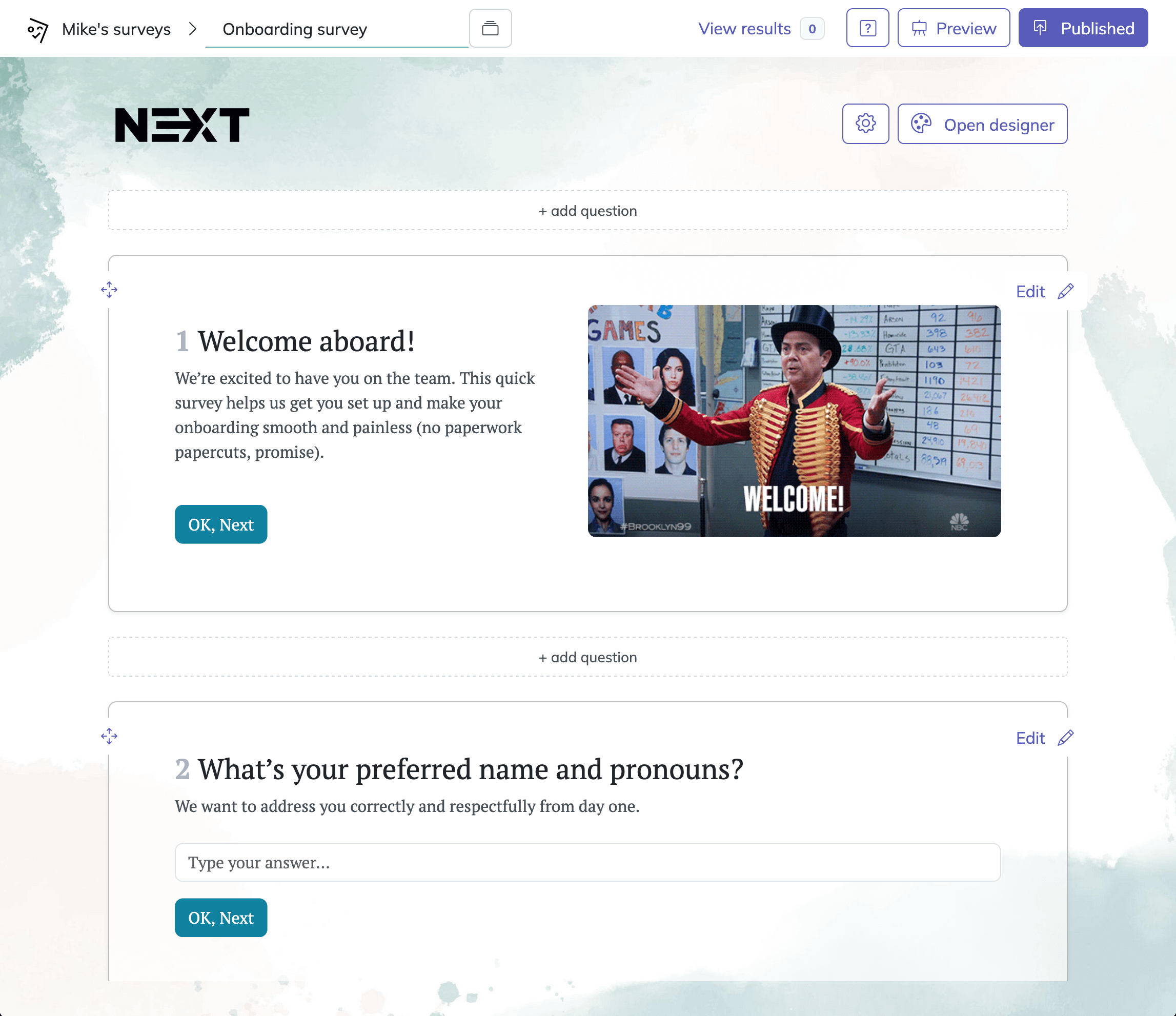
1. Start a new survey
Click the template button below these instructions to open a training survey template in HeySurvey. You can begin editing without an account. If you prefer to start from scratch, choose Empty Sheet or type your questions into the text input option. Give your survey a clear name, such as “Training Feedback,” using an online survey tool.
2. Add and customize questions
Edit the template questions or click Add Question to include your own. Ask about topics such as how relevant the training was, whether the materials were clear, and how confident participants feel applying what they learned. Use Choice questions for multiple-choice answers, Scale questions for ratings, and Text questions for written feedback. Mark essential questions as required. You can also adjust the survey’s appearance in the Designer Sidebar and preview it to check how it looks to respondents.
3. Publish and share
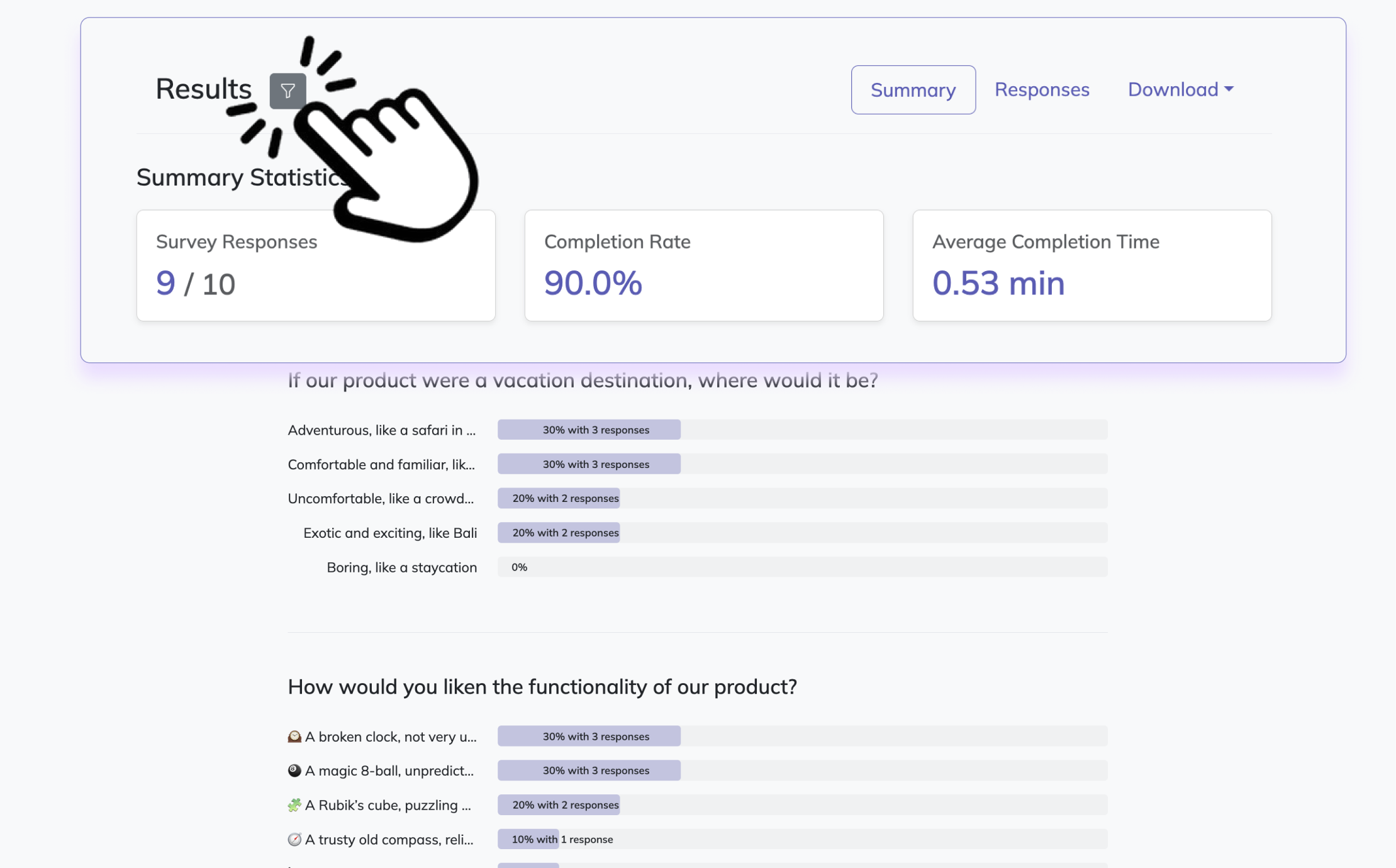
When your survey is ready, click Publish. You’ll need a HeySurvey account to publish and access responses. Copy the shareable link and send it to training participants. Once responses come in, visit the Results page to review answers and export them if needed.
2. Pre-Training Survey Questions About Readiness and Expectations
Sample questions
How much experience do you have with [training topic]? Choose: none, basic, intermediate, or advanced.
How familiar are you with [specific concept]? Use a five-point familiarity scale.
What would you like to be able to do after completing this training?
Which real-world situation would you like the training to address?
Have you completed the recommended prerequisite training? Choose: yes, no, or not applicable.
What accommodations or learning support would help you participate fully? Answering this question is optional.
Unlike a needs assessment, this questionnaire to evaluate training readiness supports a course you’ve already planned.
Send it early enough to tailor delivery before your slides become set in stone.
Use responses to adjust:
Examples and pacing for different experience levels.
Prerequisite materials learners need before attending.
Connect expectation questions to your stated learning objectives so you can clarify what the course will cover.
Plus, self-rated familiarity gives you a perception baseline, not proof of knowledge; add a short knowledge assessment to measure starting knowledge.
For online sessions, include virtual training evaluation questions about platform access and preparation.
Why & When to Use
Send this survey after registration but before the session begins.
You’ll find it especially useful for mixed-experience groups, technical courses, and training that requires advance preparation.
A meta-analysis found self-rated knowledge correlated only moderately with cognitive learning (ρ = .34), highlighting limitations of familiarity-based readiness surveys. (gwern.net) Source for examples.
3. Post-Training Survey Questions to Evaluate Course Content
Sample questions
How relevant was the training content to your current responsibilities?
How clearly did the training explain [specific concept or process]?
How useful were the practice activities for learning [specific skill]?
How would you describe the pace? Choose: much too slow, slightly too slow, about right, slightly too fast, or much too fast.
Which topic needs more explanation or practice?
What is one change that would make this training more useful?
These questions form the foundation of your questionnaire to evaluate training content.
Ask about specific objectives, examples, and exercises rather than relying on an overall satisfaction score. Your slides might earn applause without teaching anyone a new skill.
Keep your questionnaire easy to answer:
Use consistent, fully labeled five-point scales for comparable questions, matching labels to what you’re measuring.
For usefulness, try: not at all useful, slightly useful, moderately useful, very useful, and extremely useful.
Include “Not applicable” for activities participants may not have experienced.
Plus, adapt your virtual training evaluation questions to name specific online exercises.
Positive reactions alone do not establish knowledge gain or behavior change.
Why & When to Use
Send immediately after training, while participants can recall details.
Use responses to revise content, rebalance course length, and improve practical exercises.
4. Trainer and Facilitation Evaluation Survey Questions
Sample questions
How clearly did the trainer explain the material?
How effectively did the trainer answer participants’ questions?
How well did the trainer connect examples to your work?
How comfortable did you feel asking questions during the session?
How useful was the feedback you received during practice activities? Include “Not applicable.”
What should the trainer do differently in a future session?
Keep instructor feedback separate from course-content feedback in your questionnaire to evaluate training, so you can identify what actually needs improving.
You’re evaluating teaching, not auditioning your trainer for a talent show.
Make your training effectiveness survey questions specific:
Focus on observable behaviors, such as clear explanations and helpful feedback, rather than personality, appearance, or likability.
If you have multiple instructors, name the trainer each question concerns.
Adapt virtual training evaluation questions to cover facilitation behaviors, such as responding to chat questions.
Plus, explain privacy clearly: confidential feedback limits who can access identifiable responses, while anonymous feedback does not identify respondents. Confidentiality may encourage candor, but don’t promise anonymity unless you provide it.
Why & When to Use
Use these questions after instructor-led workshops, coaching sessions, or live courses.
Apply your findings to facilitator development, instructor selection, and more consistent teaching across sessions.
A meta-analysis found instructional style (ρ=.66) and human interaction (ρ=.56) were the strongest predictors of trainees’ reactions to training (Sitzmann et al., 2008).
5. Virtual Training Evaluation Questions
Sample questions
How easy was it to access the virtual training session?
How often did technical problems interrupt your learning? Choose: never, rarely, sometimes, often, or very often.
How readable were the slides and shared materials on your device?
How useful were the interactive activities for practicing the topic? Include “Not applicable.”
How manageable was the session length for maintaining your attention?
What change would most improve your virtual training experience?
Use your questionnaire to evaluate training to separate platform and access issues from content or facilitation problems.
Your slides shouldn’t take the blame for a microphone having a bad day.
Keep your virtual training evaluation questions focused:
Offer optional follow-ups about audio, captions, connectivity, and barriers to participation.
Adapt wording for live sessions versus self-paced courses, such as replacing “session length” with “module length.”
Avoid treating camera use, chat participation, or constant interaction as requirements for learning.
Route technical feedback to the support, platform, or accessibility team that can resolve it.
Why & When to Use
Use these questions after webinars, remote workshops, and online learning modules.
Plus, pair them with training effectiveness survey questions about learning and application, so you can improve accessibility, reduce technical friction, and refine remote delivery without confusing smooth technology with successful training.
6. Training Effectiveness Survey Questions for Follow-Up
Sample questions
Since completing the training, have you had an opportunity to use [specific skill]? Choose: yes or no.
How often have you used [specific skill] during the past four weeks?
How confident are you now in your ability to perform [specific task]? Reuse the pre-training confidence scale.
What, if anything, has prevented you from applying what you learned?
What is one example of how you have used the training in your work?
What additional support would help you apply the skill more consistently?
Send your questionnaire to evaluate training when learners are likely to have used the skill, with four to eight weeks as a starting point, not a deadline.
Skills need a chance to leave the classroom.
Use these training effectiveness survey questions thoughtfully:
Branch responses so learners without an opportunity to practice receive relevant barrier questions.
Match pre- and post-training questions and scales to support comparison when you can appropriately link responses.
Treat reported confidence and application as self-reports, not demonstrated competence.
Supplement responses with assessments, work observations, or relevant performance measures, without attributing every change to training.
Why & When to Use
Use these after learners have had a realistic opportunity to apply their learning, including after your initial virtual training evaluation questions.
Plus, you can identify transfer barriers, plan reinforcement, and assess whether the training remains useful beyond its first impression.
7. Best Practices for Writing Training Survey Questions
Sample questions
How relevant was [session] to your current responsibilities?
How clearly did the trainer explain [specific skill]?
What would help you apply [specific skill] at work?
Your questionnaire to evaluate training should support decisions, not collect ratings for decoration.
Dos
Start with a decision: Know what each answer will help you change.
Ask one thing at a time: Separate content, delivery, and usefulness.
Use neutral, specific wording: Name the skill or session.
Keep surveys focused: Match questions to the learning stage.
Label response scales: Define ratings and keep their direction consistent.
Allow alternatives: Offer “Not applicable” or “No opportunity to apply.”
Pilot your questionnaire: Check wording, relevance, and completion time.
Explain data handling: Clarify anonymity or confidentiality and intended uses.
Don’ts
Don’t lead respondents with wording like “our outstanding trainer.”
Don’t combine concepts, such as “clear and relevant.”
Don’t require ratings for activities learners never experienced.
Don’t collect identifying or sensitive details without a clear purpose.
Don’t treat satisfaction as proof of effectiveness.
Don’t generalize from small or unrepresentative groups without acknowledging limitations.
Don’t repeat broad ratings that add no insight.
Why & When to Use
Use these checks when drafting or revising training effectiveness survey questions, including virtual training evaluation questions.
Plus, make training questions evaluation part of your review before launch: check that every item supports a useful decision. Your survey needs a purpose, not a stamina test.
8. Turn Training Survey Insights Into Action
Sample questions
What change would make this training more useful in your role?
Which technology or accessibility barriers affected your participation?
What support would help you apply what you learned?
Your questionnaire to evaluate training earns its keep when you turn feedback into measurable improvements, rather than let it gather digital dust.
Organize findings by issue: Separate content, facilitation, technology, accessibility, and workplace application.
Review the response base: Note response counts, participation rates, missing answers, and potentially underrepresented groups.
Identify meaningful patterns: Compare rating distributions with recurring themes in open-ended responses.
Prioritize improvements: Rank issues by likely learning impact, frequency, urgency, and effort required.
Assign ownership: Give each improvement a responsible person, a deadline, and a clear success measure.
Close the feedback loop: Tell learners what you will change and what cannot change yet.
Evaluate the next iteration: Reuse core training effectiveness survey questions, noting changes in audience or delivery.
Why & When to Use
Use this process after each survey, including when reviewing virtual training evaluation questions, to connect learner feedback with your next decisions.
Plus, make training questions evaluation a repeatable habit: compare results, check progress, and adjust your priorities.
The best training survey is not your longest questionnaire to evaluate training. It is the one that leads to specific, measurable improvements.
How to Turn Training Survey Results Into Action
Survey feedback only matters when you actually do something with it.
Why & When to Use
This final section helps you turn survey results into better training, stronger employee performance, and smarter L&D decisions.
Use this process after every major training cycle or during quarterly reviews, so feedback does not just sit in a spreadsheet looking busy.
Here’s the thing: collecting responses is step one, not the finish line.
To make your survey useful, move through a simple action framework:
Review responses carefully.
Group comments and ratings into clear themes.
Prioritize the biggest issues affecting satisfaction, learning, or on-the-job application.
Assign owners to each improvement.
Implement changes.
Measure results after the update.
Plus, compare findings across cohorts, teams, and time periods.
That helps you spot whether a problem is isolated, widespread, getting better, or quietly doing cartwheels in the wrong direction.
Focus first on quick wins, like clearer materials, better pacing, or improved trainer instructions.
Then separate bigger changes that need budget, leadership support, or a full redesign.
On top of that, close the feedback loop by telling employees what changed because of their input.
That simple step builds trust and makes people more likely to give thoughtful feedback next time.
Best takeaway: the best training survey questions lead to better training decisions, not just better data.
Related Training Survey Surveys
29 Professional Development Evaluations Survey Questions
Explore 25 professional development evaluations survey questions with examples, tips, and insight...
31 Knowledge Survey Questions Examples for Effective Assessments
Explore 25 knowledge survey questions examples, with practical sample questions to help you asses...

29 Coaching Survey Questions to Improve Your Program
Explore 25 coaching survey questions with sample answers to improve feedback, gather insights, an...