31 Pre Course Survey Questions
Discover 25 pre course survey questions with sample questions to improve training feedback, course planning, and learner insights.
Before you teach, you need a clear picture of who’s showing up. A pre survey uses smart course survey questions, or even a simple pre test questionnaire sample, to uncover learner goals, skill levels, and roadblocks before day one.
Here’s the thing: a pre course survey helps you shape better lessons, boost engagement, and improve completion rates. Plus, it gives you a baseline for comparing results with post course survey questions later, which is a lot more useful than teaching with crossed fingers. If you need an online survey tool, that can make the process even easier.
Sample questions
What is your current job role or area of study?
Which industry or field do you work in?
How many years of experience do you have in this subject area?
What best describes your current level of education or training?
In which country or time zone will you be taking this course?
1. Learner Background and Demographic Survey Questions
Use a pre survey to meet learners where they actually are.
Why & When to Use
This type of pre survey works best at enrollment or about 1 to 2 weeks before your course begins. That gives you time to review answers, spot patterns, and adjust before lesson plans are locked in.
Here’s the thing: strong course survey questions help you group learners by role, industry, education level, age range, region, or similar traits that actually affect the learning experience. In workplace training, certification programs, cohort-based courses, and online academies, that context is gold.
You do not need to ask every personal question under the sun. Ask only for information that directly improves course design, because nobody enjoys a survey that feels like a nosy aunt at brunch.
A smart pre test questionnaire sample or pre course survey can help you:
tailor examples to real job roles or study paths
set the right pace for beginners, mixed groups, or advanced learners
schedule sessions more smoothly across time zones
plan group activities that make sense for learner backgrounds
choose a communication style that feels clear and relevant
On top of that, these training questions give you a cleaner starting point for future lessons, support, and post-course comparison.
Sample questions
How would you rate your current knowledge of this topic?
Which of the following skills related to this course have you already used?
How confident do you feel performing tasks covered in this course?
Have you completed any previous training on this subject?
What part of this topic do you currently find most challenging?
A 2022 meta-analysis found pre-course prior-knowledge measures strongly predict final achievement stability (r=0.534), supporting early learner background surveys for course planning (source).
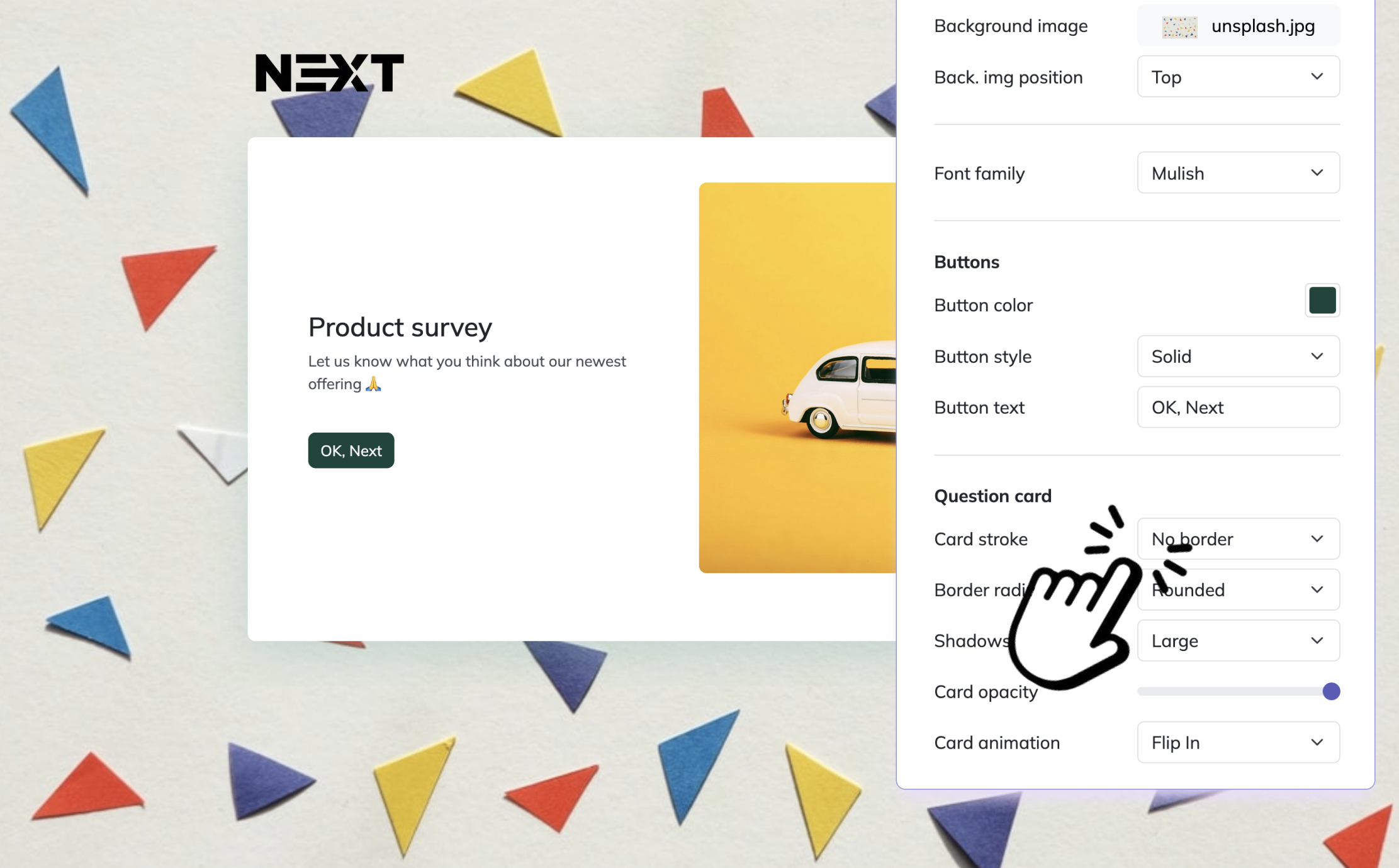
Here’s how to create a pre-course survey in HeySurvey in 3 easy steps:
1. Create a new survey
Start by opening a pre-built template with the button below, or create a new survey from scratch. HeySurvey works right in your browser, so you can begin without an account. If you want to publish later and save responses, you’ll need to sign in. Give your survey a clear internal name so you can find it easily later.
2. Add questions
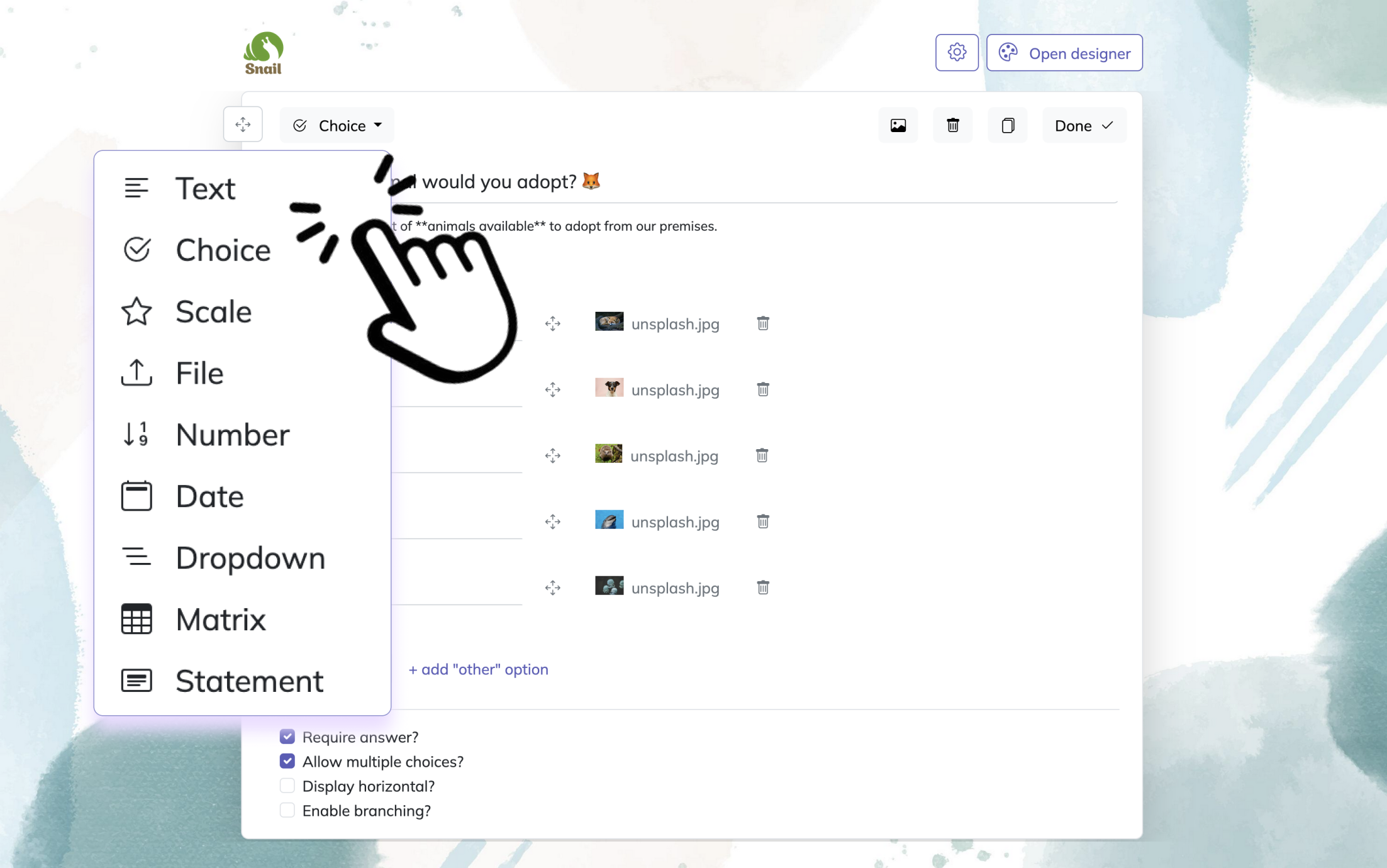
Click Add Question to include the questions you want to ask before the course begins. For a pre-course survey, use simple question types like Text, Choice, Scale, or Dropdown. You can ask about prior experience, learning goals, confidence level, or expectations. Mark important questions as required if needed.
3. Publish your survey
When your survey is ready, click Preview to check it first. Then click Publish to create a shareable link. You can send that link to participants or embed the survey on your website.
2. Prior Knowledge and Skill Level Survey Questions
Use a pre survey to find the real starting line, not just guess where it is.
Why & When to Use
These course survey questions help you measure what learners already know, how confident they feel, and how ready they are before instruction begins. That makes them a smart fit for technical training, compliance education, onboarding, and skill-building courses where starting too high or too low can wreck momentum fast.
Here’s the thing: people often search for a pre test questionnaire sample or even a pre test questionnaire example when they want to check ability early. That makes sense, but a pre survey is different because it captures self-assessment, experience, and perceived difficulty, not just right-or-wrong performance.
Plus, that distinction matters.
A formal diagnostic test measures what someone can do under test conditions. Self-assessment training questions and a pre course survey reveal how learners see their own skills, where they feel shaky, and whether they need a confidence boost before the real learning starts.
You can use responses to:
adjust course difficulty before lessons begin
split learners into beginner or intermediate tracks
add optional refreshers for people who need a quick catch-up
spot overconfident learners who may know less than they think, which is always a fun plot twist
focus class survey questions on the skills that need the most support
On top of that, this type of pre survey gives you a clearer picture of readiness without treating every learner like the exact same spreadsheet row.
Sample questions
What is your main reason for taking this course?
What specific outcome do you hope to achieve by the end of the course?
Which course topic are you most excited to learn about?
Is this course required for your job, education, or certification?
What would make this course feel successful for you personally?
Research shows learners’ prior knowledge and confidence often misalign, so pre-course self-assessment surveys help identify readiness and calibration needs before instruction begins (ScienceDirect).
3. Learning Goals and Motivation Survey Questions
A pre survey works best when it uncovers not just what learners know, but what they actually want.
Why & When to Use
These course survey questions help you understand why people enrolled, what results they expect, and what matters most to them before the course even starts. That makes this section especially useful when you want your content to feel relevant instead of sounding like it was written for a mysterious generic human.
You can use this pre course survey before launch, during registration, or inside a pre training questionnaire for workplace learning. Plus, it fits nicely alongside a pre test questionnaire sample when you want both skill data and motivation data, not just one side of the story.
Here’s the thing: learners pay more attention when lessons connect to real goals. If your pre survey reveals that most people care about job performance, certification, or solving one annoying daily problem, you can shape examples and assignments around that.
Responses can help you:
customize examples around real learner priorities
highlight benefits that matter most in course messaging
prioritize high-value modules learners are eager to reach
design assignments that feel practical, not random
improve training questions by tying them to real-world outcomes
On top of that, goal-focused class survey questions make your course feel more personal, which is hard to beat. And yes, a good pre survey can save you from building three lessons nobody was secretly excited about.
Sample questions
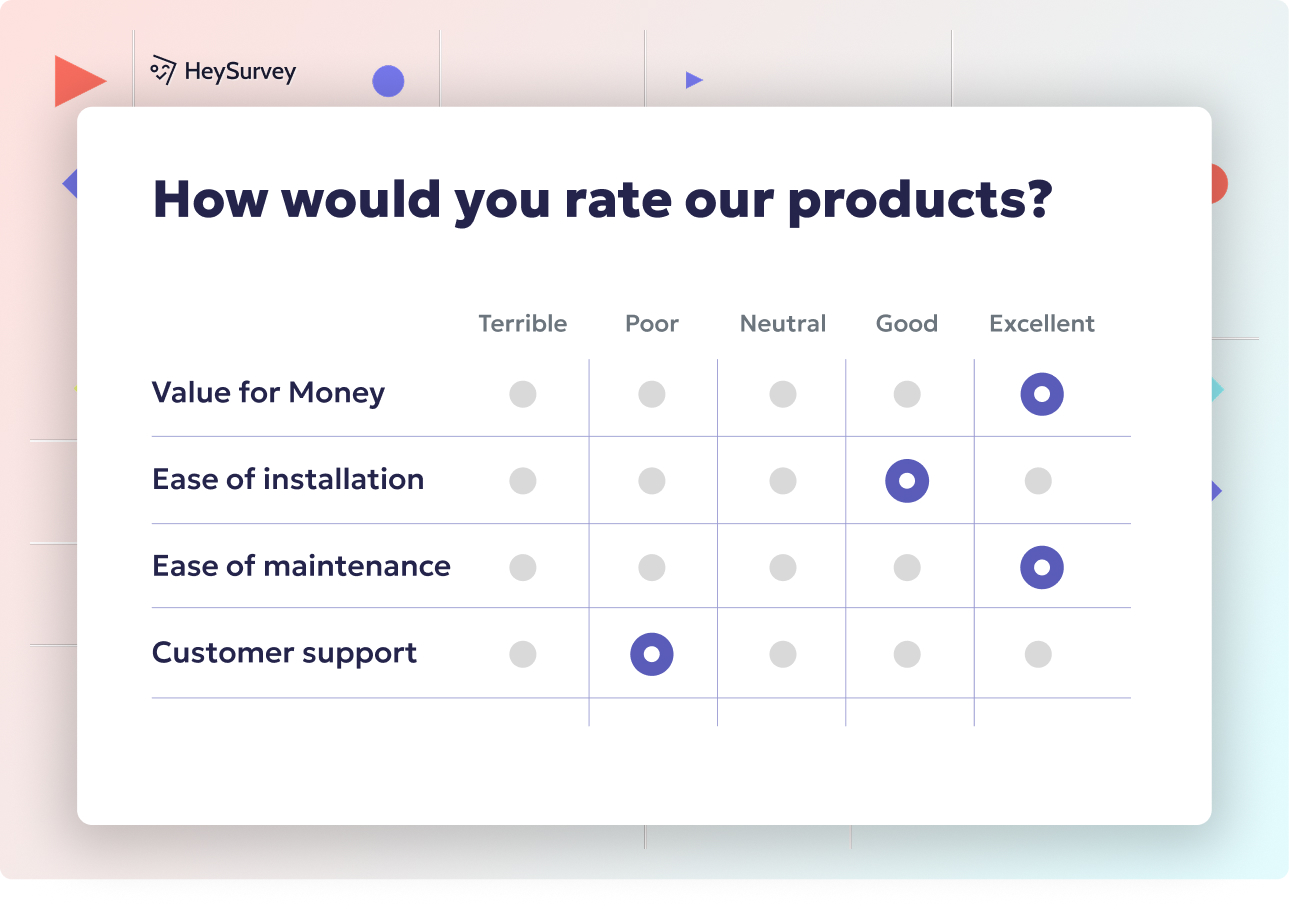
Do you prefer live sessions, self-paced lessons, or a blended format?
Which learning materials help you most: videos, readings, discussions, or hands-on practice?
How comfortable are you participating in group discussions or collaborative activities?
Do you prefer short lessons or longer deep-dive sessions?
What type of feedback helps you learn best?
4. Learning Preferences and Course Format Survey Questions
A pre survey can help you shape the learning experience in ways that feel easier, clearer, and far less guessy.
Why & When to Use
These course survey questions help you understand how learners prefer to take in information, interact with others, and move through the course. That makes them especially useful when you want your format to support real people, not just a nice-looking outline.
You can use this pre survey for live workshops, self-paced courses, hybrid programs, and even elearning survey questions where delivery choices can make or break engagement. Plus, it pairs well with a pre test questionnaire sample when you want to measure both learner readiness and learner preferences.
Here’s the thing: if you collect answers early enough, you can still adjust delivery methods, assignment formats, and support options before the course gets locked in. That gives you a better shot at choosing formats that learners will actually use instead of politely ignoring like a forgotten PDF.
Responses can help you:
choose between live, blended, or self-paced delivery
balance videos, readings, discussions, and hands-on activities
plan office hours and support based on participation comfort
improve feedback timing, format, and frequency
make smarter accessibility decisions in your pre course survey
On top of that, class survey questions like these should guide your design, not control it completely. Preferences matter, but solid instructional design still does the heavy lifting.
Sample questions
What device will you primarily use to complete this course?
How reliable is your internet access for live or video-based learning?
What time constraints or schedule challenges might affect your participation?
Will you be joining from a remote learning environment, workplace, campus, or home?
Do you anticipate any barriers that could make it harder to complete the course?
Research suggests students’ course-format choices are driven more by lifestyle constraints than learning style, supporting pre-course questions about schedules, access, and participation barriers (ERIC study).
5. Logistics, Access, and Remote Learning Survey Questions
A smart pre survey can uncover the practical stuff that quietly decides whether learners show up, stay engaged, and actually finish.
Why & When to Use
These course survey questions help you spot real-world barriers before they turn into missed sessions, late assignments, or silent drop-offs. That makes this section especially useful in online courses, hybrid programs, and any setup where learners are spread across different locations.
A strong pre course survey should not just ask what learners want to study. It should also ask what might get in the way, especially when you are working with remote learning survey questions tied to access, scheduling, and day-to-day responsibilities.
Here’s the thing: even the best course content struggles if someone has shaky Wi-Fi, one shared laptop, or a calendar that looks like a game of Tetris. A few practical questions early on can improve attendance, reduce frustration, and support better completion rates.
Responses can help you:
identify internet reliability issues before live sessions begin
understand device access, including phone-only or shared-device learners
spot time commitments like work shifts, caregiving, or commuting
plan for learners joining from home, campus, work, or another remote learning environment
offer recordings, flexible deadlines, low-bandwidth materials, or alternative participation methods
Plus, this section works nicely alongside a pre test questionnaire sample, since readiness is not just about knowledge. Sometimes the biggest training questions are wonderfully unglamorous, like whether the video will load before lunch.
Sample questions
Do you need any accommodations or learning support to participate fully in this course?
Are there any language, reading, or communication challenges we should be aware of?
What might prevent you from staying engaged throughout the course?
How comfortable are you asking questions when you need help?
What kind of support would help you succeed in this course?
6. Support Needs and Potential Barriers Survey Questions
A thoughtful pre survey helps you spot support needs early, so small concerns do not grow into big learning roadblocks.
Why & When to Use
These course survey questions are useful when you want to understand what learners may need before problems show up in week two with a dramatic entrance. They work especially well in high-stakes training, longer programs, onboarding courses, and classes with diverse learner backgrounds.
A strong pre course survey can reveal concerns that learners may not raise on their own. That includes accessibility needs, language or reading challenges, confidence issues, and outside workload pressure that could affect participation.
Here’s the thing: many people will not speak up unless you ask clearly and respectfully. That is why this kind of pre test questionnaire sample should feel supportive, not nosy, and should reassure learners that honest answers help you create a better experience.
Responses can help you:
plan outreach for learners who may need extra check-ins
build support plans around accommodations, pacing, or communication preferences
offer mentoring, office hours, or confidence-building help
make inclusive teaching choices based on language, reading, or participation needs
adjust workload, deadlines, or learning activities when common barriers appear
Plus, these class survey questions and training questions help you respond early, which is much easier than trying to rescue a struggling learner after they have already gone quiet.
Sample questions
Is each question tied to a clear course design decision?
Can learners answer this question quickly and easily?
Does this question avoid jargon, bias, or leading wording?
Will the answer provide useful insight before the course starts?
Am I asking only for information I truly plan to use?
7. How to Write Effective Pre Course Survey Questions: Best Practices
Great pre survey design turns random feedback into useful action.
Why & When to Use
This section helps you create better course survey questions before you hit send. Think of it as your practical framework for making a pre survey short, clear, and actually useful instead of a form that quietly collects dust.
Here’s the thing: even a strong pre test questionnaire sample can fall flat if the questions are vague, too long, or impossible to act on. The goal is to ask only what helps you improve the course, support learners, or adjust delivery before the class begins.
Use these self-check prompts when building a pre course survey, reviewing training questions, or tightening class survey questions for a new program. Plus, they help you avoid the classic mistake of asking everything and learning nothing, which is a little like bringing five suitcases for a one-day trip.
Keep these best practices in mind:
Do keep the survey brief and relevant.
Do group questions by topic.
Do mix multiple-choice and short-answer formats when useful.
Do explain why the survey matters.
Do protect privacy and collect only necessary information.
Do compare pre course survey questions with post course survey questions later to measure change.
And avoid these common misses:
Don’t ask vague or overly broad questions.
Don’t overload learners with too many items.
Don’t collect sensitive data without a clear reason.
Don’t ask questions after course design is already locked if no changes can be made.
Don’t ignore survey responses once collected.
Sample questions
Which learner needs appear most often across responses?
Are there clear beginner, intermediate, and advanced segments?
What common barriers could reduce engagement or completion?
Which goals should be reflected more clearly in the course content?
What changes can be made before launch to better support learners?
8. How to Analyze Pre Course Survey Results and Turn Insights Into Action
A pre survey only matters if you use it to make smarter course decisions.
Why & When to Use
Collecting pre survey responses is just step one. The real value shows up when your course survey questions help you adjust teaching, improve communication, and shape a better learner experience before the course even begins.
Here’s the thing: you do not need fancy dashboards or analytics jargon to make a pre course survey useful. You just need to spot patterns, decide what matters most, and turn those insights into clear actions.
Start by looking for repeated themes in your pre test questionnaire sample results. If many learners mention low confidence, limited time, or missing background knowledge, that is your cue to adapt the course instead of hoping everyone somehow magically catches up.
Use the results to guide practical changes like these:
Revise examples so they match learner goals and real-world situations.
Adjust pacing if responses suggest the group is more beginner or advanced than expected.
Add prerequisite resources for learners who need a stronger starting point.
Change communication so expectations, deadlines, and support options are crystal clear.
Offer flexible support, like office hours, checklists, or bonus help materials.
Document what you learn for future course iterations.
Plus, compare pre survey findings with later course survey questions or post course survey questions. That helps you see what improved, what still needs work, and whether your training questions actually led to better outcomes.
Sample questions
Which survey questions give you the clearest view of learner readiness?
What learner goals should shape your course most strongly?
Which barriers can you address before the first lesson?
How will you act on survey insights before the course begins?
What will you measure later to see whether your changes worked?
9. Final Thoughts on Using Pre Course Survey Questions to Improve Learning Outcomes
The best pre survey is short, smart, and actually used.
Why & When to Use
Here’s the thing: the most effective pre survey is not the longest one or the fanciest one. It is the one that gives you useful answers, supports better teaching decisions, and helps learners start strong without feeling like they just took a pop quiz before the real quiz.
When your course survey questions are clear and purposeful, you get a better picture of readiness, goals, skill gaps, and possible roadblocks. That means you can shape content, pacing, support, and communication in ways that feel more relevant from day one.
A strong pre course survey can help you:
spot learner needs before they turn into learner struggles
tailor examples and activities to real goals
improve engagement by making the course feel more useful
adjust delivery based on experience levels and time constraints
connect your pre test questionnaire sample to later evaluation results
Plus, the real win is building a repeatable process. You ask better training questions, make smarter changes, and then compare those insights with post-course feedback to see what worked.
On top of that, this turns your survey from a one-time task into a practical improvement loop. Ask, adjust, measure, repeat, and yes, steal that formula from your own best classes again and again.
Related Training Survey Surveys
31 Professional Development Evaluation Survey Questions
Explore 25 professional development evaluations survey questions with sample answers, insights, a...
29 Knowledge Survey Questions Examples
Explore knowledge survey questions examples with 25 sample questions to inspire clear, effective ...
29 Coaching Survey Questions to Improve Your Program
Explore 25 coaching survey questions with sample answers to improve feedback, gather insights, an...