29 Post Call Survey Questions
Explore 25 post call survey questions with sample questions to improve customer feedback, call quality, and service insights.
A smart post-chat survey or post call survey helps you hear what customers really think after support, service, or sales conversations, and that matters for customer experience, QA, agent coaching, and retention. Funny how one tiny online survey maker survey can reveal the big stuff.
In this guide, you’ll get practical post-chat survey examples, post-chat survey questions, and survey ideas for after call survey, end call survey, call center survey, call centre survey, call center customer satisfaction survey, and first call resolution survey questions. Plus, you’ll see which survey types work best in support calls, service calls, sales calls, and blended teams.
Sample questions
How satisfied were you with the help you received on this call?
Did our agent fully address your reason for calling today?
How easy was it to get the support you needed during this call?
How would you rate your overall experience with our call center today?
What is one thing we could have done better on this call?
Customer Satisfaction Post Call Survey Questions
This is your go-to pulse check.
Why & When to Use
This is the most common post-chat survey style for measuring overall satisfaction after a support or service interaction, even when the conversation happened by phone instead of chat.
If you run high-volume call center surveys, this format gives you a simple, repeatable way to track customer sentiment without making customers feel like they just enrolled in homework.
It works especially well after:
inbound support calls
billing questions
account help
appointment scheduling
general service calls
Here’s the thing: these post-chat survey examples and post-chat survey questions also map neatly to an after call survey or call center customer satisfaction survey.
Plus, they are ideal when you need trend reporting by team, queue, or issue type across lots of conversations.
A strong post-chat survey should stay short, clear, and easy to answer.
Mix rating-scale questions with one open-ended question so you get both clean reporting and useful customer language.
For example, a score tells you what happened, while a comment helps explain why it happened.
On top of that, low scores should never live alone.
Review them alongside call recordings and QA evaluations so you can spot whether the issue came from agent behavior, policy friction, or a process that tripped the customer at the finish line.
Sample questions
Was the agent courteous and respectful throughout the call?
Did the agent listen carefully to your issue before responding?
How clearly did the agent explain the next steps or solution?
Did you feel the agent was knowledgeable about your question or problem?
How would you rate the agent’s professionalism on this call?
Research consistently identifies first-call resolution as one of the strongest drivers of call-center customer satisfaction, making post-call surveys especially valuable when they measure resolution quality (ScienceDirect).
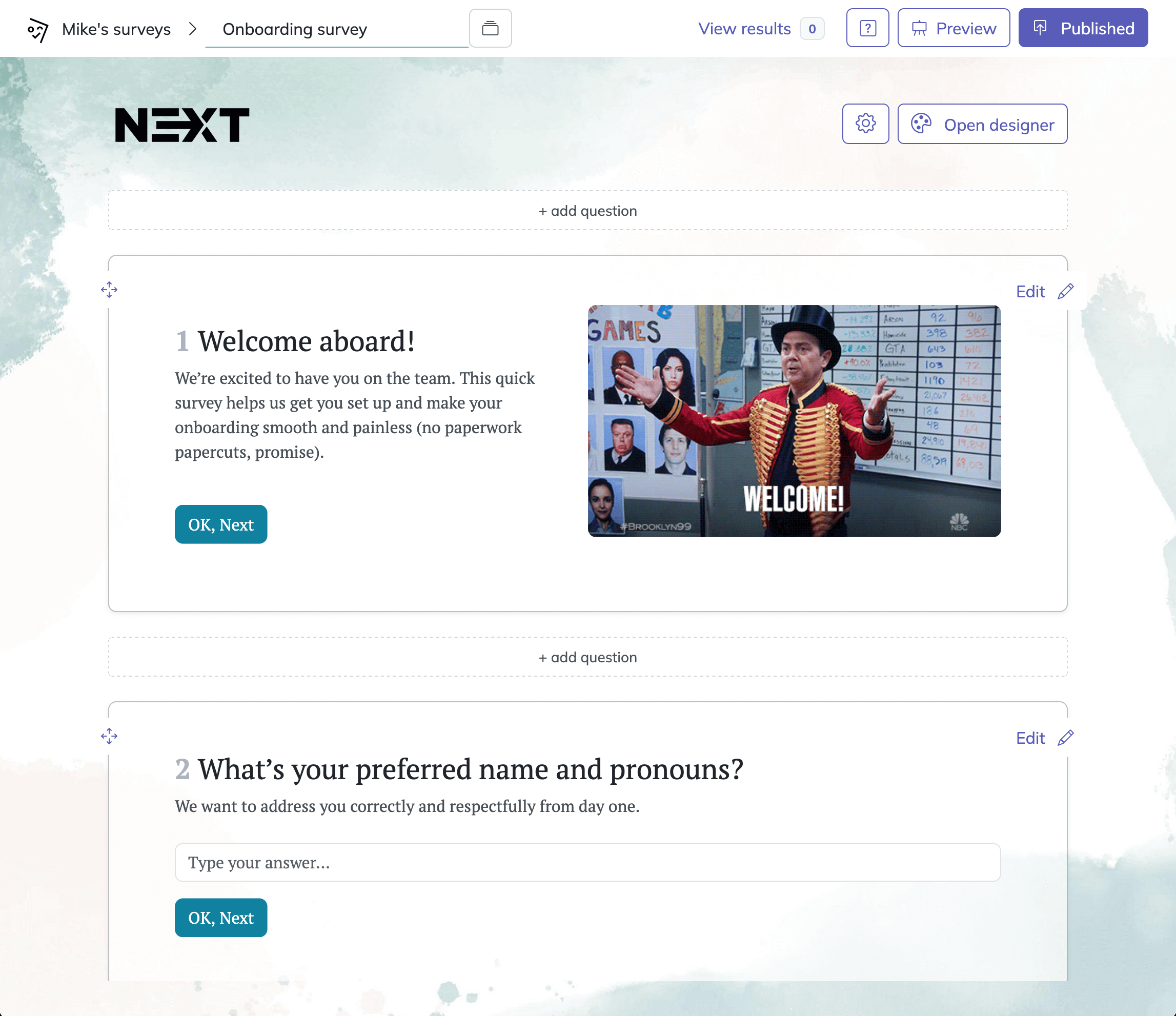
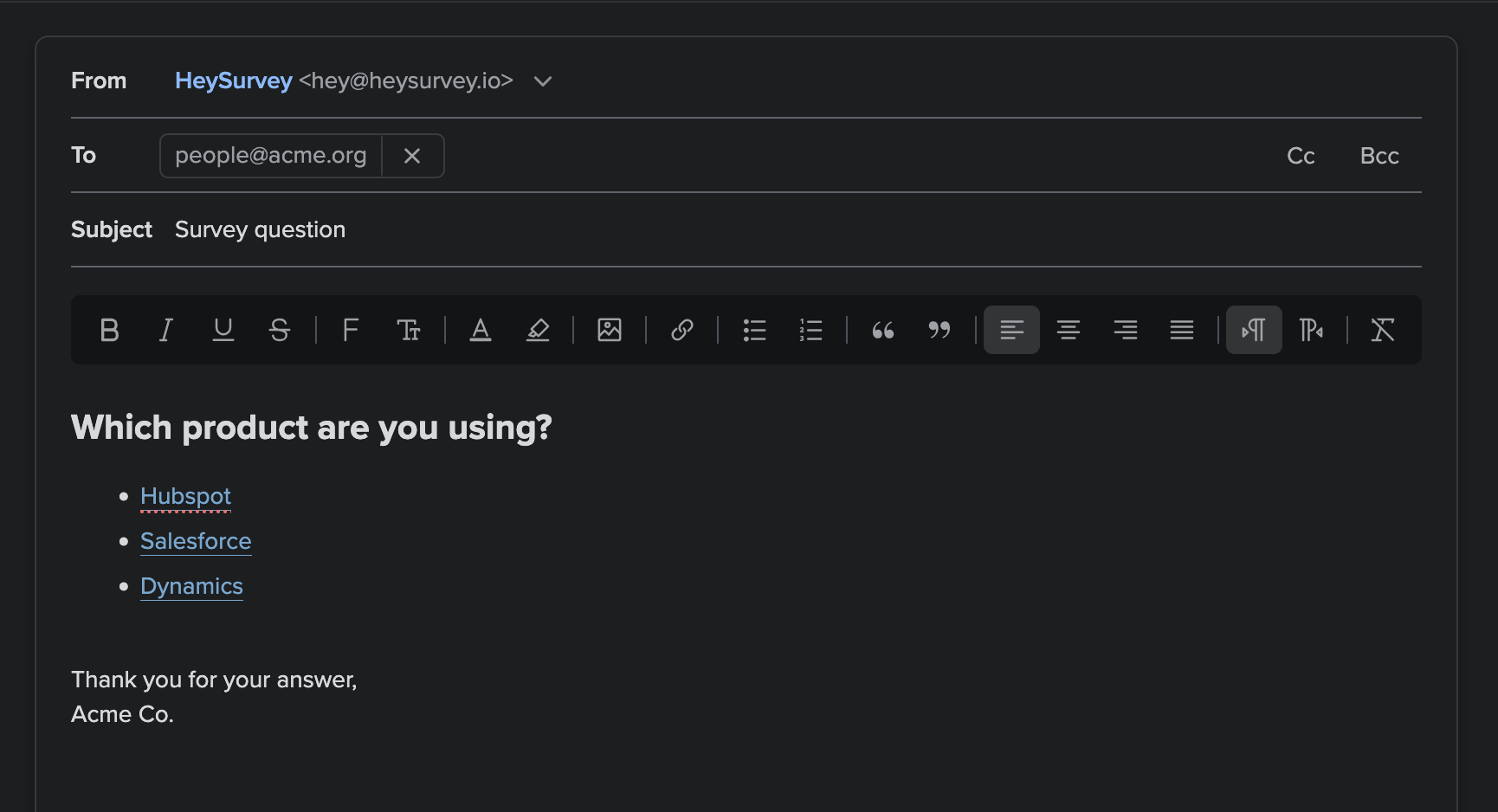
How to create a post-call survey in HeySurvey
1. Create a new survey
Open HeySurvey and choose a template to get started quickly, or begin with a blank survey if you want to build it yourself. You can start without an account, but you’ll need one to publish and view responses. Give your survey a clear internal name, then use the settings panel to add your logo, set start and end dates, and choose whether respondents can submit more than once.
2. Add questions
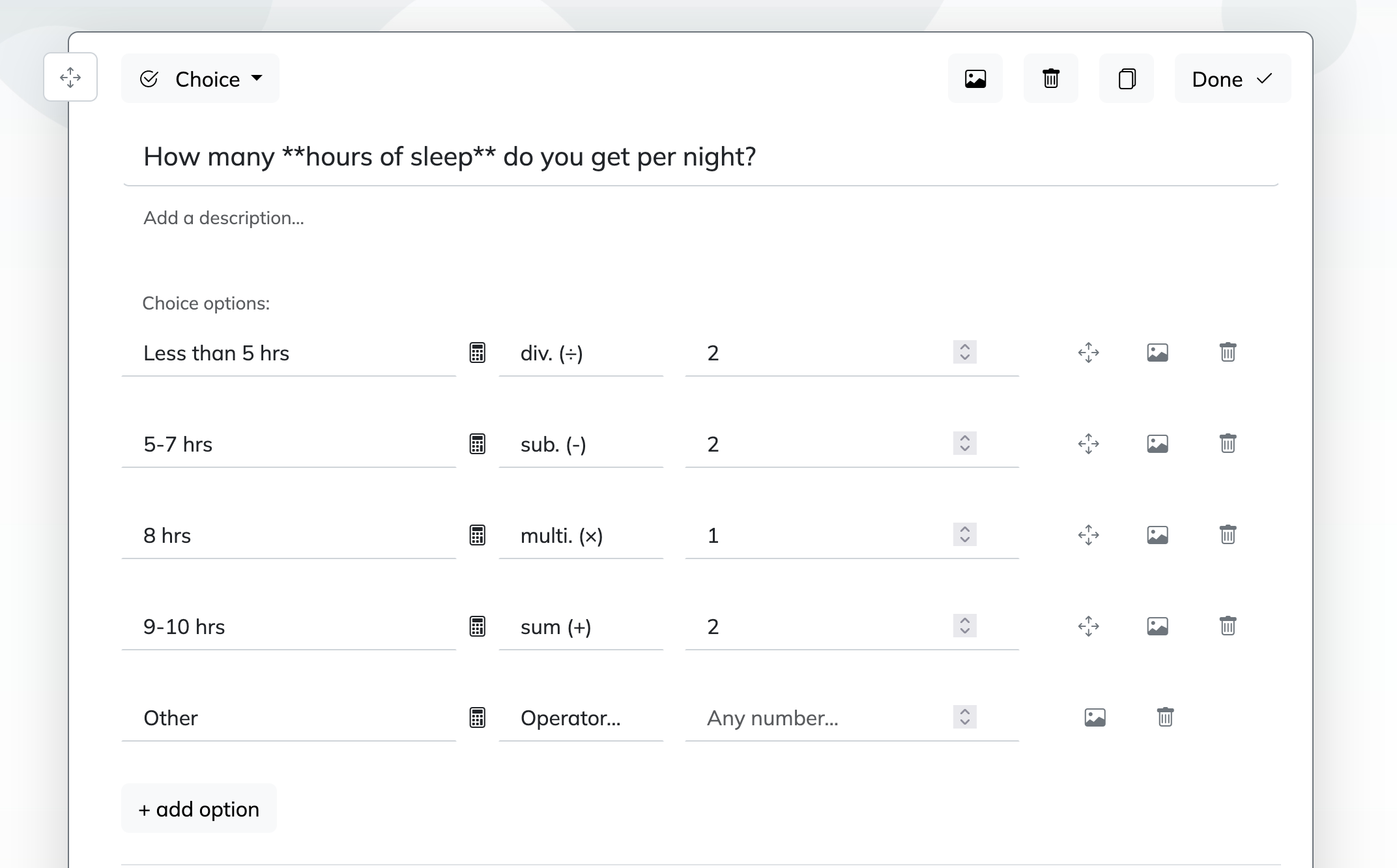
Click Add Question to include the questions you want to ask after a call. For a post-call survey, simple question types work best: use Choice for satisfaction ratings, Scale or NPS for overall experience, and Text for open feedback. Mark important questions as required if you want every response completed. You can also add branching to show follow-up questions based on an answer.
3. Publish survey
Preview your survey to check the flow, then click Publish to create a shareable link. After publishing, you can send the survey to callers, embed it on your website, or collect responses through other channels.
Agent Performance and Professionalism Survey Questions
This section helps you measure the human side of service.
Why & When to Use
Use this type of post-chat survey when you want to understand how customers felt about the specific representative, not just the company overall.
These post-chat survey questions are especially useful for coaching, quality assurance, service consistency, and employee recognition programs.
They work well in both call center and call centre settings where leaders want measurable service standards without turning a customer-facing survey into something that sounds internal, stiff, or robot-approved.
Plus, these post-chat survey examples can align closely with call center agent survey questions while still feeling simple and natural for customers to answer.
This format is a smart fit after conversations where agent behavior really shapes the experience, such as:
complex support calls
escalations
technical troubleshooting
billing disputes
first-time customer interactions
Here’s the thing: do not overload your post-chat survey with too many agent-only questions.
If a customer is upset about company policy, long wait times, or a missing refund, that frustration may not reflect the agent’s actual performance.
On top of that, review agent scores with context, not in isolation.
Use results to coach themes like empathy, clarity, listening, and product knowledge, then compare them with QA reviews or call survey feedback for the full picture.
Sample questions
Was your issue fully resolved during this call?
Do you expect to contact us again about the same issue?
Did you leave this call knowing exactly what will happen next?
How confident are you that your issue is now solved?
If your issue was not resolved, what is still missing?
Research shows 71% of calls are resolved on the first call, making post-call questions about resolution and repeat contact highly predictive of customer experience (source).
First Call Resolution Survey Questions
These post-chat survey questions show whether one conversation actually did the job.
Why & When to Use
First call resolution measures whether a customer’s issue was handled without needing to come back again later.
That makes this type of post-chat survey especially useful when you care about resolution speed, fewer repeat contacts, and smoother operations across support teams.
These post-chat survey examples are a strong fit for teams researching first call resolution survey questions or improving customer experience survey call center programs.
They work especially well after:
technical support calls
account access issues
claims conversations
troubleshooting sessions
order problem calls
Here’s the thing: a resolved ticket is not always the same as a resolved customer.
Your system may show a case as closed, but your customer may still be confused, waiting, or already planning round two. Nobody wants a sequel to a support call.
Plus, perceived resolution matters because customers judge the experience based on what they believe will happen next, not just what your workflow says.
On top of that, pair post-chat survey questions with repeat-contact data from your call center survey or call survey reports.
If customers say they are resolved but still call back, follow-up dependency may be weakening true resolution.
Use open text in your post-chat survey too, because comments often reveal the process gaps, handoff issues, or unclear next steps driving repeat contact.
Sample questions
How easy was it to get your issue handled today?
Did you have to repeat information during the call?
How easy was it to understand the instructions or solution provided?
How much effort did you personally have to make to get help on this issue?
What part of the call process felt most difficult or frustrating?
Effort and Ease-of-Service Survey Questions
These post-chat survey questions help you spot friction fast, before it turns into churn.
Why & When to Use
Effort-focused post-chat survey questions measure how hard your customer had to work to get help.
That matters because low-effort experiences often predict loyalty better than satisfaction scores alone, especially when the agent was kind but the process felt like a maze with hold music.
These post-chat survey examples are useful when you want to improve the journey, not just the tone of the conversation.
They fit especially well in a post-chat survey, post call survey, or end call survey program when your team deals with process-heavy support.
Use them after:
IVR-heavy support calls
transfers between teams
long verification steps
billing or claims workflows
complex troubleshooting journeys
Here’s the thing: customers can forgive a problem more easily than they forgive unnecessary effort.
Plus, these post-chat survey questions can reveal exactly where friction lives, including transfer pain points, long holds, repeated explanations, and confusing instructions.
On top of that, compare effort results by call reason.
That helps you see whether password resets, delivery issues, or account changes create more strain in your call survey, call center survey, or call centre survey results.
These live chat post survey questions and call center surveys work especially well for operational improvement initiatives, because they show where your systems make customers do too much work.
Sample questions
Based on this call, how likely are you to recommend our company to others?
Did this interaction improve, reduce, or not change your opinion of our company?
How confident are you in continuing to do business with us after this call?
Did this call increase your trust in our team?
What most influenced your rating today?
Research summarized in Harvard Business Review found Customer Effort Score predicts loyalty better than satisfaction or NPS, making effort-focused post-call surveys especially valuable. Source
Net Promoter and Loyalty Post Call Survey Questions
These post-chat survey questions help you measure brand lift, not just whether one conversation went smoothly.
Why & When to Use
Loyalty-focused post-chat survey questions are best when the call had real relationship weight.
Think account reviews, escalations, renewals, premium support, or high-stakes service moments where one conversation can strengthen trust or quietly send it jogging toward a competitor.
Unlike standard post-chat survey questions that measure a single interaction, this type of post-chat survey looks at the broader effect of the call on how customers feel about your company overall.
Here's the thing: a customer can be satisfied with an agent and still feel less loyal to the brand.
Use these post-chat survey examples when you want to connect feedback to bigger outcomes like retention, expansion, and referrals.
They work especially well for:
high-value customer interactions
account management conversations
escalations that could affect renewal risk
premium or white-glove support
relationship-building service calls
Plus, loyalty questions are not ideal for every routine balance-check or password-reset call.
Use them after meaningful interactions, then pair them with follow-up text fields so customers can explain promoter or detractor scores in their own words.
On top of that, segment results by customer tier, account value, or lifecycle stage.
That gives your call survey, call center survey, or call centre survey program more strategic insight than typical transactional metrics, and helps your call center surveys show which conversations actually move long-term loyalty.
Sample questions
Which channel did you use before or after this call: phone, live chat, email, or messaging?
Was this call easier or harder than your previous chat or digital support experience?
Did you have to repeat your issue when moving from chat to phone support?
How satisfied were you with the overall experience across all support channels?
What could we improve when handing off between live chat and phone support?
Omnichannel and Post-Chat Follow-Up Survey Questions
These post-chat survey questions help you spot where support feels seamless, and where it feels like customers got passed around like a hot potato.
Why & When to Use
If you support customers across phone, live chat, email, and messaging, consistency matters more than ever.
This type of post-chat survey is ideal when you want to compare experiences across channels instead of judging each one in a silo.
Use these post-chat survey examples when customers often start in one place and finish in another.
That makes them especially useful for blended support teams where a chat turns into a call, or a call follows a messaging conversation.
Here's the thing: strong service in one channel does not cancel out a clunky handoff in another.
That is why post call survey questions should be adapted into channel-specific post-chat survey questions, live chat post survey questions, and related post-chat survey formats that reflect the actual journey.
These questions work well for:
teams comparing call center survey and post-chat survey results side by side
businesses trying to reduce repeated explanations across channels
support leaders looking for omnichannel friction points
call center surveys designed to measure handoff quality, not just agent performance
Plus, not every business needs this section.
But if your customers bounce between digital support and phone support, these post-chat survey questions can reveal the hidden gaps that make an otherwise good experience feel weirdly exhausting.
Sample questions
Are we asking questions that customers can answer quickly and clearly?
Are we sending surveys immediately after the call while the experience is fresh?
Are we measuring the outcomes we actually plan to improve?
Are we collecting enough open-ended feedback to understand low scores?
Are we reviewing survey responses by call type, queue, and agent team?
Best Practices for Writing and Running Post Call Surveys
A smart post-chat survey or call survey setup is not just about the questions, it is about timing, targeting, and what you do next.
Why & When to Use
If you are building a post call survey program at scale, this is your operational playbook.
Even great post-chat survey questions can flop if the survey is too long, sent too late, or reviewed like a dusty report nobody wants to open.
Here's the thing: strong post-chat survey examples help, but execution decides whether customers respond and whether your team learns anything useful.
Use these best practices when you are launching a new post-chat survey, cleaning up weak response rates, or comparing call center survey and call centre survey results across teams.
A good system should help you collect cleaner feedback without annoying customers into the void.
Keep these dos and don’ts in mind:
Do keep most post-chat survey questions to 3 to 5 total.
Do match each post-chat survey goal to what you want to improve, like satisfaction, effort, resolution, or coaching.
Do send the post-chat survey or call survey soon after the interaction.
Do segment results by call reason, team, and customer type.
Do combine survey feedback with QA, AHT, repeat contact, and resolution data.
Don’t ask multiple questions that measure the same thing.
Don’t blame agents for issues caused by staffing or policy.
Don’t make every post-chat survey mandatory or overly long.
Don’t rely only on scores without reading comments.
Don’t copy live chat post survey questions directly into call center surveys without adapting the wording.
Plus, delivery can vary by SMS, email, IVR, or in-app prompts, and sampling matters because survey fatigue is very real.
Sample questions
Did this survey ask about the part of the experience you actually had?
Were any of these questions confusing or repetitive?
Did you feel this survey was too long for the issue you called about?
Were you able to fairly rate the agent separately from company policies?
Is there anything important about your experience this survey failed to ask?
Common Mistakes That Weaken Call Center Survey Results
Small survey mistakes can quietly turn useful feedback into very confident nonsense.
Why & When to Use
If you already run a post-chat survey, call survey, or call center survey but the results feel off, this is the section you need.
Here’s the thing: weak survey design can distort feedback, lower response rates, and push you toward fixes that do not actually solve customer problems.
Use this when your post-chat survey examples look fine on paper, but your team still doubts the data or keeps making decisions that miss the mark.
Some of the biggest mistakes show up again and again:
Asking leading post-chat survey questions that nudge customers toward a positive answer.
Sending the post-chat survey or after call survey too late, when details are fuzzy.
Cramming too many goals into one survey, like effort, resolution, policy fairness, and agent friendliness all at once.
Using score-only call center surveys without open comments, which hides root causes.
Mixing agent performance with company policy issues, so ratings become unfair.
Ignoring low response bias, where only very happy or very upset people reply.
On top of that, repetitive or bloated live chat post survey questions can make customers quit before finishing, which is basically your survey ghosting you.
Plus, review old post-chat survey templates regularly.
Audit wording, timing, and length so your post-chat survey examples and call centre survey formats stay clear, relevant, and genuinely useful.
Sample questions
Which survey trends point to the biggest customer pain points right now?
What recurring themes appear in low-scoring responses?
Which issues are tied to agent behavior versus broken processes?
What quick-win improvements can we test first?
How will we track whether changes improve future survey scores?
Turning Post Call Survey Insights Into Action
A post-chat survey only matters when it changes what you do next.
Why & When to Use
Use this final step when you have plenty of post-chat survey examples, post-chat survey questions, or call center survey data, but need to turn feedback into real improvements.
Here’s the thing: a post-chat survey, call survey, or call center survey creates value only when results lead to coaching, process fixes, and a better customer experience.
Start by prioritizing issues based on what shows up most often, how badly it hurts the experience, and how much business impact it creates.
Then sort findings into clear action paths so the right team owns the fix:
Coaching issues for agent skills, tone, product knowledge, or resolution habits.
Policy issues for rules that frustrate customers even when agents do their best.
System issues for broken tools, long wait times, routing problems, or clunky workflows.
Plus, look for quick wins first.
A small fix to live chat post survey questions, hold messaging, or authentication steps can improve scores faster than a giant overhaul that moves like a sleepy turtle.
On top of that, close the loop with frontline teams.
Share what post-chat survey questions and call center surveys revealed, explain what will change, and track whether future scores, comments, and repeat-contact rates improve.
The best post call survey questions are the ones that produce decisions, not just data.
Related Customer Survey Surveys
29 Restaurant Survey Questions
Explore 25 sample restaurant survey questions to improve customer feedback, boost service quality...

29 Airbnb Survey Questions to Ask Guests
Discover 25 Airbnb survey questions with sample questions, insights, and practical examples to im...
32 Interior Design Survey Questions
Explore 25 interior design survey questions with sample questions to gather client insights, refi...