31 Help Desk Survey Questions
Discover 25 help desk survey questions with sample responses to improve support quality, boost satisfaction, and gather valuable customer feedback.
When you use help desk customer satisfaction survey questions, you get a simple way to measure support quality, team performance, and what your customers actually think, instead of guessing and hoping for the best.
The best help desk customer satisfaction survey questions change with the moment, like after ticket resolution, live chat, onboarding, escalations, or internal support. Plus, if you are wondering how to write a question in-app support service teams can use well, this guide covers help desk customer satisfaction survey types, sample support survey questions, best practices, and how to turn feedback into action with an online survey maker.
Customer Satisfaction (CSAT) Help Desk Survey Questions
Sample questions
How satisfied were you with the help you received today?
Did our support team resolve your issue to your satisfaction?
How would you rate the overall quality of this support interaction?
How satisfied were you with the professionalism of the support representative?
Based on this experience, how satisfied are you with our help desk service?
CSAT gives you a fast pulse check on support quality.
Why & When to Use
CSAT surveys measure immediate satisfaction with a specific support moment, like a resolved ticket, finished live chat, or completed email exchange.
That makes them one of the most useful help desk customer satisfaction survey questions formats when you want quick, clear feedback without making customers feel like they just enrolled in homework.
Here’s the thing, CSAT works best when you send it right after the interaction ends, while the experience is still fresh and the details are not floating off into the void.
Use this type of help desk customer satisfaction survey when you want to track agent-level performance, compare teams, and spot friction in the support experience before it turns into a bigger issue.
If you are figuring out how to write a question in-app support service teams can actually use, keep CSAT simple and direct.
A good setup usually includes:
A rating scale like 1 to 5 or 1 to 10
One follow-up open text question, such as “What could we have done better?”
Consistent timing right after ticket closure or chat completion
Trend tracking over weeks or months, instead of overreacting to one spicy response
Plus, this is the most common structure used in a help desk satisfaction survey, help desk survey, or other support survey questions because it is easy to answer and easy to benchmark over time.
CSAT surveys yield higher response rates and better-quality data when sent immediately after a support case closes, while the experience is still fresh (Qualtrics).
How to create a help desk survey in HeySurvey
1. Create a new survey
Start by opening a template with the button below, or create a survey from scratch. HeySurvey lets you begin without an account, so you can explore the editor first. Once your survey opens, you can rename it and adjust basic settings if needed.
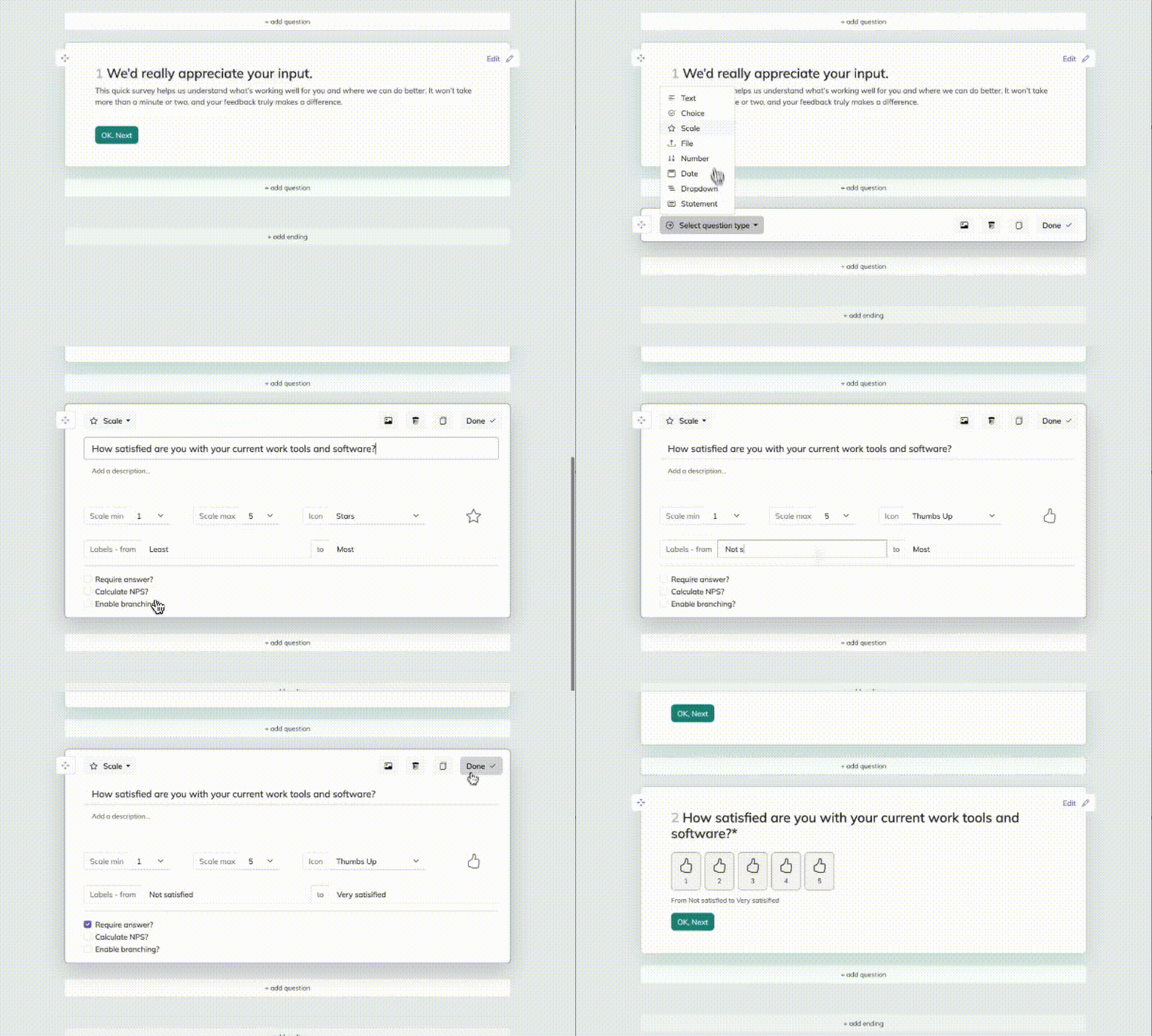
2. Add questions
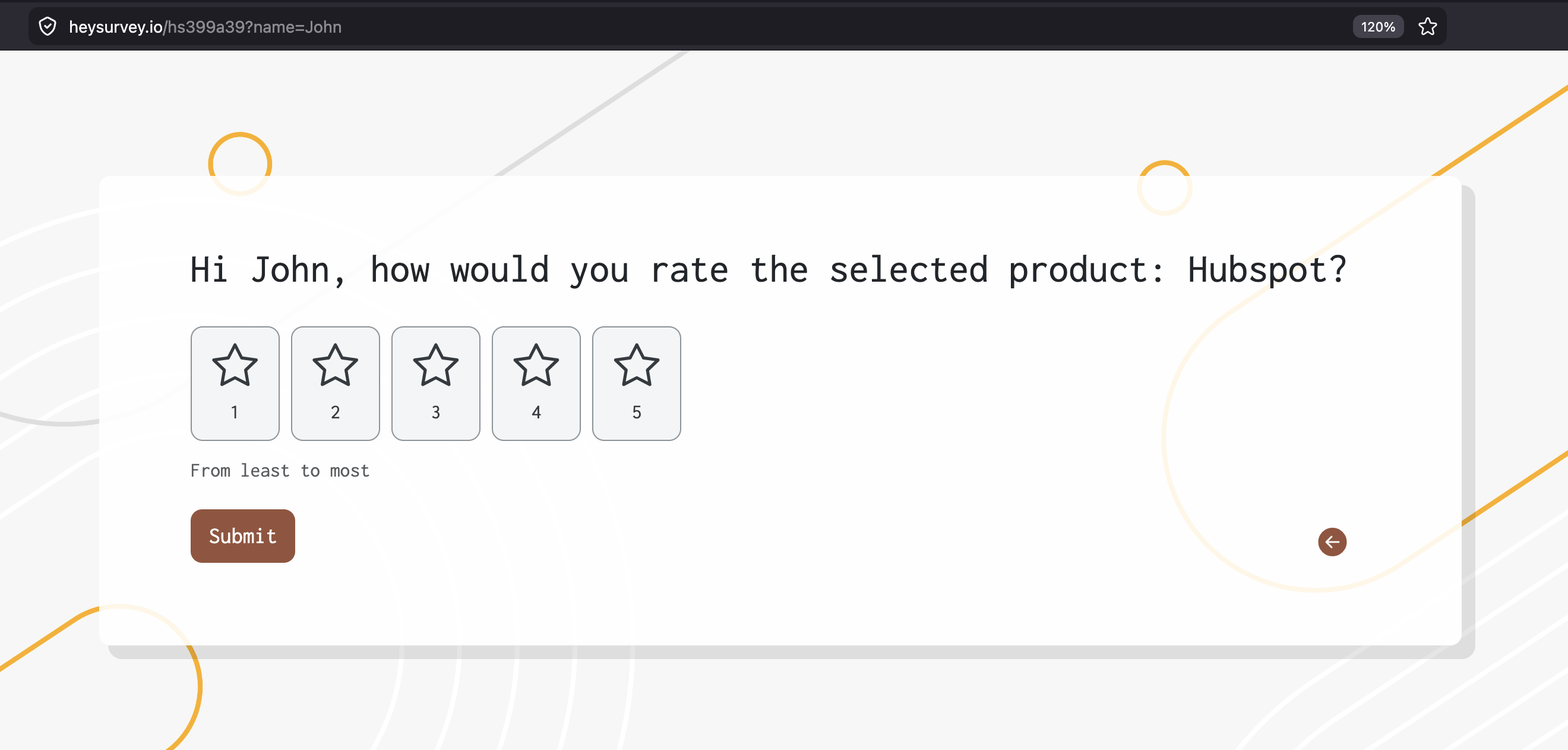
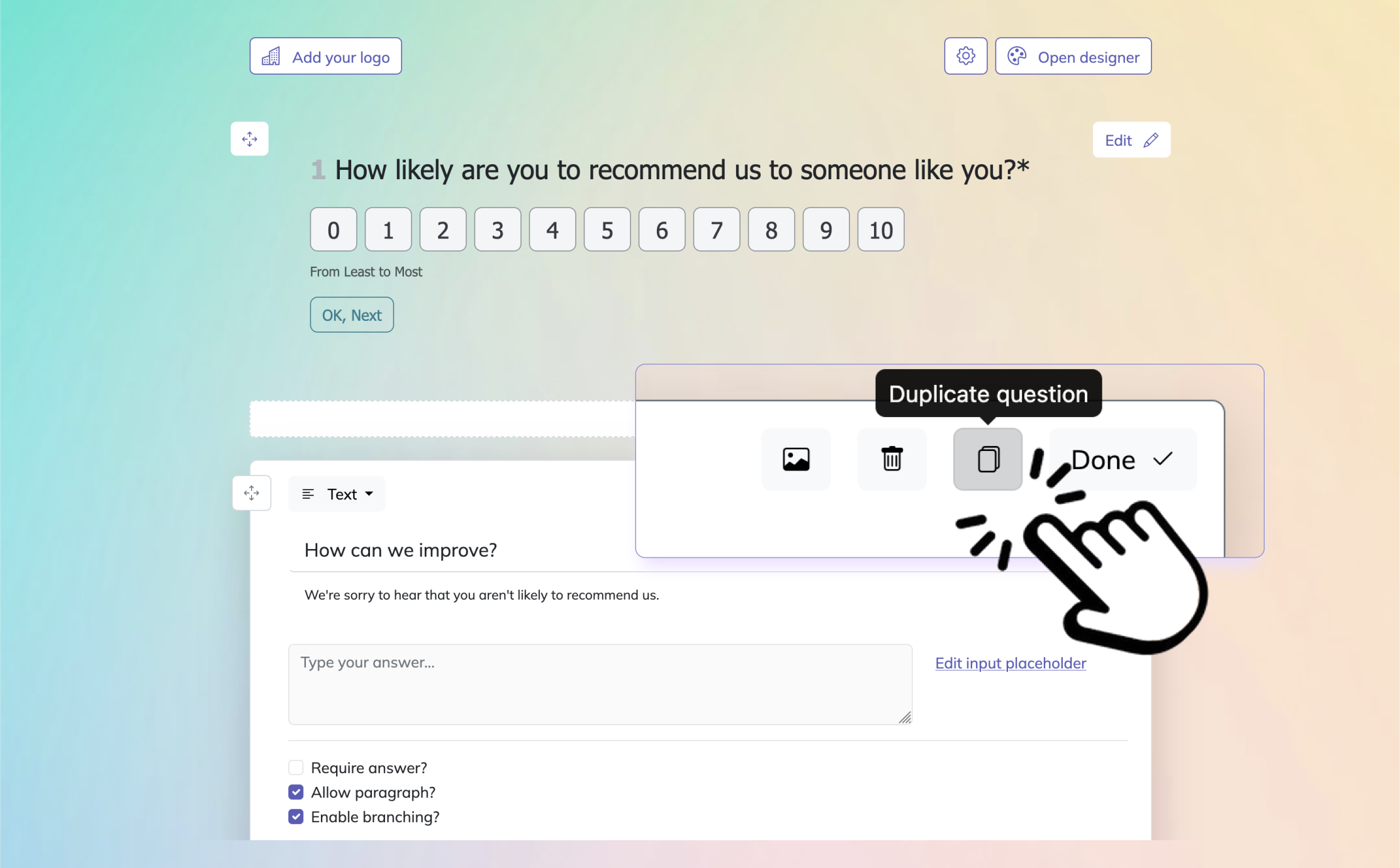
Click Add Question and choose the best question type for help desk feedback. A good help desk survey usually includes a mix of Scale, Choice, Text, and NPS questions. Ask about agent friendliness, response time, issue resolution, and overall satisfaction. You can mark questions as required, add descriptions, and use branching if you want to show follow-up questions only when needed.
3. Publish your survey
Preview the survey to check how it looks, then click Publish when you’re ready. After publishing, HeySurvey gives you a shareable link you can send to customers or add to email and your website.
Net Promoter Score (NPS) for Help Desk Experience
Sample questions
How likely are you to recommend our company based on your recent support experience?
How likely are you to recommend our help desk team to a colleague or friend?
What was the main reason for your score?
What could our support team have done better?
What did our help desk do especially well during this experience?
NPS shows whether support is helping loyalty grow or quietly wobble.
Why & When to Use
Net Promoter Score measures whether your help desk customer satisfaction experience is strong enough to make people recommend your company, not just feel okay about one ticket.
Here’s the thing, NPS is bigger-picture than most survey questions for restaurants customer satisfaction survey questions because it connects support to brand loyalty and long-term trust.
In plain English, scores usually fall into three groups:
Promoters are happy customers who are likely to recommend you
Passives are satisfied enough, but not excited enough to cheer from the rooftops
Detractors had a weaker experience and may be more likely to complain, leave, or warn others
Plus, this makes NPS useful after major support milestones, repeated service interactions, onboarding support, or in a periodic help desk survey.
It can also complement your help desk customer satisfaction data when you want to see whether support is shaping the overall relationship, not just closing tickets fast.
On top of that, if you are thinking about how to write a question in-app support service teams can learn from, always pair the rating with open text.
That follow-up helps you spot repeat complaints, common praise, and trends that executives love seeing in reports.
Just do not send NPS after every tiny interaction, or your help desk survey questions may start feeling like pop quizzes nobody asked for.
Use it with CSAT, resolution time, and other operational metrics, not instead of them.
Bain research found relative Net Promoter Scores explain 10%–70% of subsequent revenue-growth differences among competitors, supporting NPS as a loyalty signal for support surveys (source).
Customer Effort Score (CES) Support Survey Questions
Sample questions
How easy was it to get the help you needed today?
How easy was it to resolve your issue with our support team?
The support process made it easy for me to solve my problem.
How much effort did you have to put in to get your issue resolved?
Was it easy to find the right support channel for your question?
CES helps you spot friction before it quietly turns into churn.
Why & When to Use
Customer Effort Score measures how easy or difficult it was for someone to get help, solve an issue, or finish a support-related task.
Here’s the thing, help desk customer satisfaction is not always about delight, because in many cases people mostly want support to feel fast, clear, and painless.
That is why CES works so well in help desk customer satisfaction survey questions, especially when your goal is reducing friction instead of collecting general praise.
Use CES when you want to improve moments like:
self-service searches that should lead to answers fast
chat support where delays or transfers add effort
onboarding support that involves multiple steps
tricky issue resolution where customers may need follow-up
Plus, if you are thinking about how to write a question in-app support service teams can actually use, CES is a smart fit for in-app support experiences.
It captures friction in the moment, while the memory is still fresh and before annoyance has time to put on a dramatic costume.
Keep the scale wording simple, such as:
Very easy
Somewhat easy
Neither easy nor difficult
Somewhat difficult
Very difficult
On top of that, strong CES feedback often points straight to process fixes like transfers, repeated explanations, unclear instructions, and slow follow-up, which makes it especially useful in any help desk survey or support survey questions set.
Ticket Resolution and Quality Survey Questions
Sample questions
Was your issue fully resolved by our help desk?
How confident are you that the solution provided will prevent the issue from happening again?
Were the instructions or next steps clear and easy to follow?
Did the support team understand your problem correctly?
Was the final solution accurate and complete?
Resolution quality tells you whether the fix actually fixed something, not just whether the ticket disappeared politely.
Why & When to Use
This type of feedback focuses on whether the problem was truly solved and whether the answer was accurate, complete, and useful.
Here’s the thing, help desk customer satisfaction survey questions should not treat "closed" and "resolved" like twins, because one is a status and the other is the whole point.
Use this format when the support work is more technical or higher stakes, such as:
technical support teams handling product issues
complex troubleshooting across multiple steps
engineering support surveys tied to bug fixes or system behavior
service desk interactions where a weak fix creates repeat problems
Plus, help desk customer satisfaction depends on more than speed or friendliness.
A fast, cheerful answer that misses the real issue is still a miss, just with better manners.
This approach also works well in service desk assessment questionnaire planning, especially if you want to measure fix quality instead of surface-level experience.
On top of that, if you are thinking about how to write a question in-app support service teams can learn from, include one question about clarity of explanation and one about whether the fix will last.
Review low scores next to reopen rates and repeat contacts, because that combo often reveals whether your help desk survey questions are measuring real resolution or just administrative closure.
First-contact resolution strongly correlates with higher satisfaction and lower repeat contacts, making resolution-quality survey questions critical for help desk measurement (Qualtrics).
Response Time and Communication Survey Questions
Sample questions
How satisfied were you with the speed of our initial response?
Did our support team keep you informed throughout the process?
How clear were the updates and explanations you received?
How satisfied were you with the time it took to resolve your issue?
Did you feel our communication was timely, professional, and easy to understand?
Fast replies matter, but clear updates are often what save the relationship.
Why & When to Use
This survey type measures how customers felt about speed, updates, clarity, tone, and communication across the full support experience.
Here’s the thing, help desk customer satisfaction survey questions should not lump every timing issue into one bucket, because initial response speed and final resolution speed tell you different stories.
Use this format when complaints are more about delays, weak follow-up, or confusion than about a bad technical fix.
It is especially useful for help desk customer satisfaction tracking when you want help desk survey sample questions that focus on service quality, communication habits, and customer expectations.
Communication-focused help desk survey questions are extra valuable in email support and multi-touch ticket workflows, where people may wait between updates and wonder if their issue fell into a digital black hole.
Plus, proactive status updates often drive satisfaction more than teams expect.
When you plan a help desk customer satisfaction survey, make sure you cover more than raw timing:
separate first response speed from total resolution time
ask whether updates were proactive, not only available when requested
measure clarity, empathy, and expectation-setting
check whether the customer felt informed during delays
On top of that, if you are deciding how to write a question in-app support service teams can actually use, remember this: frustration often comes from silence, not just slowness.
Internal Help Desk and Service Desk Assessment Questions
Sample questions
How satisfied are you with the support provided by our internal help desk?
Did the service desk resolve your issue in a way that minimized disruption to your work?
How clear were the instructions, updates, or policy explanations you received?
How easy was it to submit and track your support request?
What should our internal support team improve to better support your work?
Internal support is not just about fixing tickets, it is about keeping your people moving.
Why & When to Use
Internal help desk surveys collect feedback from employees who depend on IT, HR, facilities, or other shared-service teams to do their jobs without unnecessary chaos.
Use this format for internal service desks, enterprise support functions, and any recurring service desk assessment questionnaire program where you want a clearer view of how support affects day-to-day work.
Here’s the thing, internal users often judge support differently from external customers.
They care about help desk customer satisfaction too, but they may care even more about lost productivity, confusing policies, and whether the issue messed up their workday like a surprise pothole.
This section also fits naturally if your goal matches a helpdesk feedback survey template or service desk assessment questionnaire, especially when you want to improve internal operations instead of customer-facing support.
When you shape help desk customer satisfaction survey questions for employees, adapt the language so it feels relevant to their work:
ask about downtime, delays, or productivity loss
measure clarity of instructions, updates, and policy explanations
segment results by department, issue type, or location
balance satisfaction feedback with SLA performance and operational KPIs
On top of that, if you are thinking about how to write a question in-app support service teams can use internally, make sure it reflects business impact, not just friendliness.
Help Desk Survey Best Practices
Sample questions
Are we sending this survey at the right moment in the support journey?
Is each question necessary to a decision we plan to make?
Are our questions neutral and easy to understand?
Have we included at least one open-ended feedback question?
Do we have a process for reviewing and acting on responses?
Great surveys are short, timely, clear, and actually used.
Why & When to Use
Even strong help desk customer satisfaction survey questions can flop if your survey is too long, badly timed, biased, or totally disconnected from action.
Here’s the thing, this section is your practical framework for building any help desk customer satisfaction survey or help desk survey that people will actually finish without sighing dramatically.
Use these best practices when you are creating a new help desk satisfaction survey, fixing weak response rates, or figuring out how to write a question in-app support service teams can send at the right moment.
Keep your setup simple and useful:
Do keep surveys short and focused.
Do send surveys close to the support interaction.
Do use consistent scales for trend tracking.
Do include one open-text question for context.
Do segment results by channel, team, issue type, and customer tier.
Plus, avoid the classic faceplants:
Don’t ask leading or emotionally loaded questions.
Don’t combine multiple ideas into one question.
Don’t overload every ticket with long surveys.
Don’t rely on one metric alone.
Don’t collect feedback without follow-up accountability.
On top of that, think about survey frequency, channel fit, and whether anonymity will help people answer honestly.
A smart help desk customer satisfaction process also closes the feedback loop, because collecting responses and ignoring them is basically survey karaoke with no audience.
How to Turn Help Desk Survey Feedback Into Action
Sample questions
Which low-scoring themes appear most often across help desk surveys?
Which issues are tied to poor satisfaction but high ticket volume?
Are low scores linked to specific channels, teams, or workflows?
What changes can we test in the next 30 days based on survey feedback?
How will we communicate improvements back to customers or employees?
Feedback only matters when you turn it into fixes.
Why & When to Use
Collecting help desk customer satisfaction survey questions and responses is only half the job.
Here’s the thing, your help desk customer satisfaction data creates value when you spot trends, find root causes, and make improvements people can actually feel.
Use this final step when your team already runs a help desk customer satisfaction survey, help desk survey, helpdesk surveys, or a helpdesk feedback survey template and wants results that go beyond pretty dashboards.
Start by grouping feedback into clear themes:
Speed
Clarity
Resolution quality
Empathy
Ease of use
Plus, do not review survey scores in isolation.
Combine your help desk satisfaction survey results with operational data like first response time, reopen rates, escalations, and SLA breaches so you can see what is really driving frustration.
On top of that, prioritize fixes based on two things:
How often the issue shows up
How much it hurts satisfaction or workload
Create a simple review cadence, assign an owner for each improvement, and test changes within the next 30 days.
If you are wondering how to write a question in-app support service teams can act on, aim for questions that reveal what to improve, not just how bad things felt.
The best help desk survey questions lead to better support experiences, because a report alone will not fix a clunky workflow, no matter how fancy the spreadsheet looks.
Best Practices: Dos and Don’ts for Writing High-Impact Help Desk Survey Questions
The best survey questions are short, clear, useful, and respectful of your user’s time.
Writing strong support survey questions is not complicated, but it does require discipline.
You want to collect honest feedback without exhausting the person giving it.
That means every question should earn its place.
If a question will not drive a decision, improvement, or insight, it probably does not belong.
The best support survey questions follow a few simple rules.
Keep surveys short enough to finish in under a minute when possible.
Use language that sounds human.
Mix rating scales with one or two open-ended prompts so you get both trend data and real context.
Automate your trigger points so surveys arrive at the right moment, whether that is after ticket closure, after chat, or during a periodic review.
Most important of all, close the feedback loop.
If people share concerns and never see change, response rates and trust both drop.
Useful survey writing habits include:
Keep each question focused on one idea.
Use plain wording instead of technical or corporate jargon.
Match the survey length to the interaction type.
Make forms mobile-friendly and easy to tap through.
Ensure accessibility with readable text, clear contrast, and simple layouts.
On top of that, avoid common mistakes.
Do not write leading questions that push people toward a flattering answer.
Do not ask for unnecessary personal data.
Do not blast surveys after every tiny interaction, because survey fatigue is real and relentless.
And never ignore negative feedback, even if it arrives with the emotional energy of a soggy rain cloud.
Bad survey design usually fails in one of two ways.
It is either too vague to be useful or too long to be completed.
Both are avoidable.
A thoughtful set of help desk customer satisfaction survey questions should feel easy for the user and valuable for the team.
That is the sweet spot.
If you are building a helpdesk feedback survey template, remember that accessibility matters too.
People may open your survey on a phone, tablet, desktop, or screen reader.
If the design is awkward, your completion rate will suffer before your carefully crafted question even gets a chance.
The smartest survey is the one your users can actually finish.
Good help desk surveys do not need to be flashy to work. They need to be timely, clear, and tied to real improvements. If you use the right mix of CSAT, CES, NPS, FCR, service quality, in-app, internal, and benchmarking questions, you will get a much sharper view of what support feels like from the user side. Plus, you will know where to simplify, where to train, and where to fix the process instead of guessing. That is how better support gets built, one smart question at a time.
Related Customer Survey Surveys
29 Restaurant Survey Questions
Explore 25 sample restaurant survey questions to improve customer feedback, boost service quality...

29 Airbnb Survey Questions to Ask Guests
Discover 25 Airbnb survey questions with sample questions, insights, and practical examples to im...
32 Interior Design Survey Questions
Explore 25 interior design survey questions with sample questions to gather client insights, refi...